

Rear-view
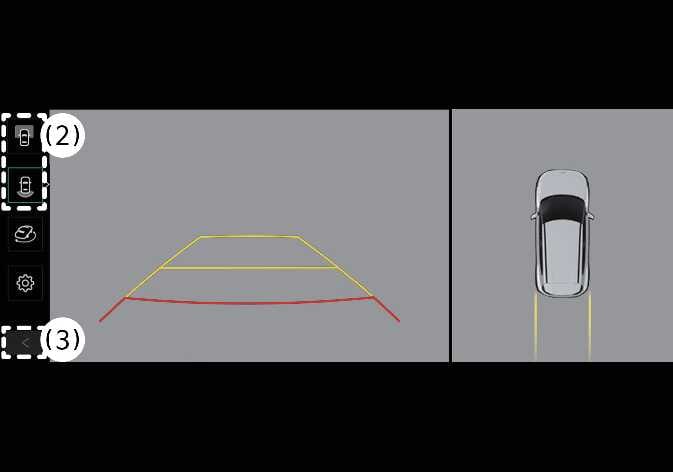 N_QVe27_C00_013_E |
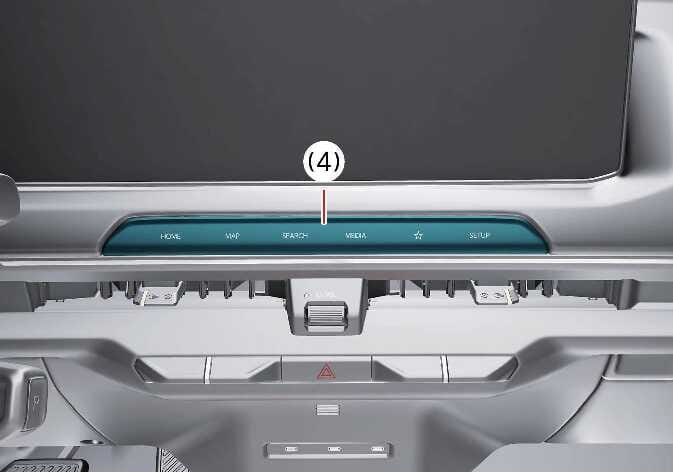 N_QVe27_B10_058_E |
(2) View switching button
(3) back button
(4) infotainment system operation button
The Surround View Monitor’s Rear-view function assists you with safe parking by displaying activity behind the vehicle on the navigation system, according to your selected settings.
Parking
The Surround View Monitor’s Rear-view function activates when you are parking under the following conditions:
-
You press the Parking/View button (1), then select Rear View with the view switching button (2) while the gear is set to P (Park), N (Neutral), or D (Drive) with a speed below 10 km/h (6 mph).
-
You shift the gear to R (Reverse).
Press the view switching button (2) on the Surround View Monitor to select Top View, Front View, Side View, or Wide View.
The Surround View Monitor’s Rear-view function turns OFF when you are parking under the following conditions and the gear is set to P (Park), N (Neutral), or D (Drive):
-
You shift the gear from N (Neutral) or D (Drive) to P (Park).
-
You press the Parking/View button (1).
-
You press the back button (3) on the Surround View Monitor screen.
-
You press the infotainment system power button (4).
-
You drive above 10 km/h (6 mph).
The Surround View Monitor’s Rear-view function turns OFF when you shift the gear from R (Reverse) to P (Park).
-
The Rear View always displays when you shift the gear to R (Reverse).
-
When you shift the gear to R (Reverse), the video does not turn OFF if you press the infotainment system power button (4).
While Driving
The rear view of the Surround View Monitor while driving turns on in the following condition:
-
When the vehicle is in N (Neutral) or D (Drive) and the vehicle speed is over 10 km/h (6 mph), press the Parking/View button (1), then press the view switch button (2) to select Rear View.
You can select Rear View or Rear Wide View by pressing the view switch button ② on the Surround View Monitor screen.
The rear view of the Surround View Monitor while driving turns off in the following conditions:
-
Shifting to P (Park).
-
Pressing the Parking/View button (1).
-
Pressing the Back button (3) on the Surround View Monitor screen.
-
Pressing an infotainment system operation button (4).
-
When Rear View while driving is turned on, the last used view is displayed.
-
Rear parking guidelines are not displayed in Rear View while driving.
-
Once activated, Rear View while driving remains on even if the vehicle speed drops below 10 km/h (6 mph).
-
When Rear View while driving is turned on, Rear Top View and Rear Side View are disabled at all speeds.