
Locking/unlocking/remote starting/remote parking with the smart key
Smart key
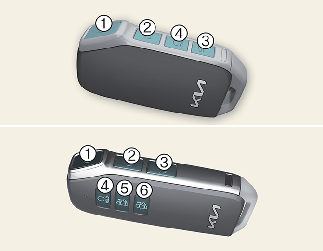
-
Lock
-
Unlock
-
Tailgate unlock/open
-
Remote start
-
Remote Start Parking Assist (Forward)
-
Remote Start Parking Assist (Backward)
Operation
-
Press the corresponding button.
-
Press the door lock button (1) and hold the remote start button (4) for 2 seconds to start the vehicle remotely.
-
Press the forward/backward buttons (5, 6) to move the vehicle forward/backward.
Non-operating condition(s)
-
Being close to a radio transmitter such as a radio station or an airport which can interfere with normal operation of the smart key.
-
Being near a mobile two-way radio system or a cellular phone.
-
Another vehicle's smart key is being operated close to your vehicle.

-
If you press the tailgate unlock/open button for longer than a second, the lock will be released or the tailgate will be opened according to the options of the vehicle.
-
If any door, hood or tailgate remains open, the hazard warning lights will not operate.
-
After pressing unlock button, the doors will lock automatically unless you open any door within 30 seconds.
-
After pressing the Lock/Unlock button, The hazard warning lights will flash.
-
To start the vehicle remotely, the smart key should be detected within 10 m (32 ft) distance from the vehicle, and the remote start button should be pressed within 4 seconds after the doors are locked.
-
If no further action for operating/driving the vehicle is taken, the vehicle will be turned off 10 minutes after starting the vehicle remotely.
-
The driver can move the vehicle forward or backward using the forward/backward buttons (5, 6) on the smart key. For more details of Remote Smart Parking Assist (RSPA), refer to More Details.
Removing the mechanical key from the smart key
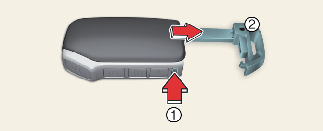
-
Tab
-
Mechanical key
Operation
-
Press and hold the tab (1).
-
Pull the mechanical key (2) out.