

System layout – control panel
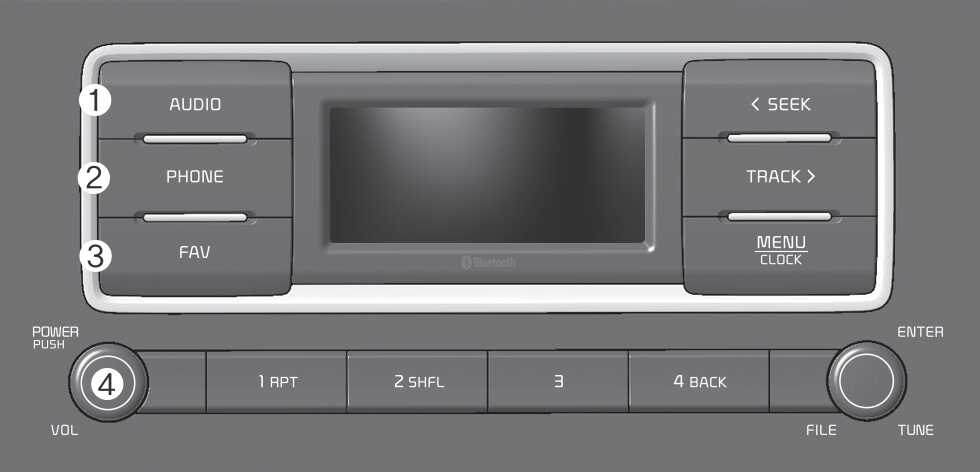
(With Bluetooth Wireless Technology)
The system’s actual appearance and layout may differ depending on the vehicle model and specification.
-
AUDIO button
-
Press to display the radio/media mode selection window.
-
When the mode selection window displays, turn the [ TUNE] knob to select the desired mode and then press the knob.
-
When the Mode popup is not selected in [ MENU/CLOCK] ▶ Mode popup, press the [ AUDIO] button on the control panel to change the mode.
Each time you press the [ AUDIO] button on the control panel, the mode switches to radio ▶ media in order.
-
-
PHONE button
-
Press to start connecting a mobile phone via Bluetooth.
-
After a Bluetooth phone connection is made, press to access the Bluetooth phone menu.
-
-
FAV button
-
Whilst listening to the radio, press to move to next page of the preset list.
-
-
POWER button/VOL knob
-
Press to turn the system on or off.
-
Turn to the left or right to adjust the system sound volume.
-
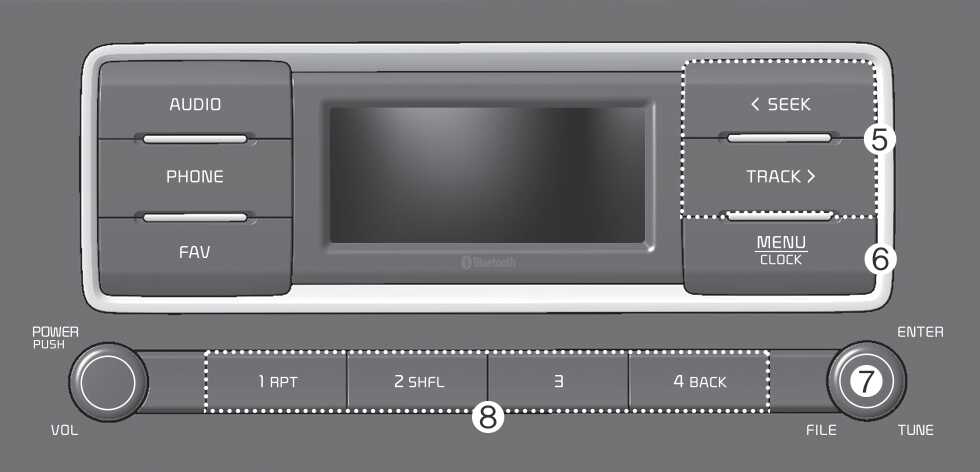
(With Bluetooth Wireless Technology)
The system’s actual appearance and layout may differ depending on the vehicle model and specification.
-
SEEK/TRACK button
-
Change the station/track/file.
-
Whilst listening to the radio, press and hold to search for a station.
-
Whilst playing media, press and hold to rewind or fast forward (except for Bluetooth audio mode).
-
-
MENU button/CLOCK button
-
Press to access the menu screen for the current mode.
-
Press and hold to access the time setup screen.
-
-
TUNE knob/FILE knob/ENTER button
-
Whilst listening to the radio, turn to adjust the frequency.
-
Whilst playing media, turn to search for a track/file (except for Bluetooth audio mode).
-
Whilst searching by turning the knob, press to select the current track/file (except for the Bluetooth audio mode).
-
-
Number buttons (1 RPT~ 4 BACK)
-
Whilst listening to the radio, press to listen to a saved radio station.
-
Whilst listening to the radio, press and hold to save the current radio station to the preset.
-
In the USB/Bluetooth audio modes, press the [ 1 RPT] button to change the repeat play mode. Press the [ 2 SHFL] button to change the shuffle play mode.
-
Press the [ 4 BACK] button to return to the previous screen (except for the radio preset list).
-