

Using the USB mode
You can play media files stored in portable devices, such as USB storage devices and MP3 players. Check compatible USB storage devices and file specifications before using the USB mode.
Connect your USB device to the USB port in the vehicle.
-
Playback starts immediately.
-
Press the [ AUDIO] button on the control panel to display the mode selection window, turn the [ TUNE] knob to select USB and then press the knob.
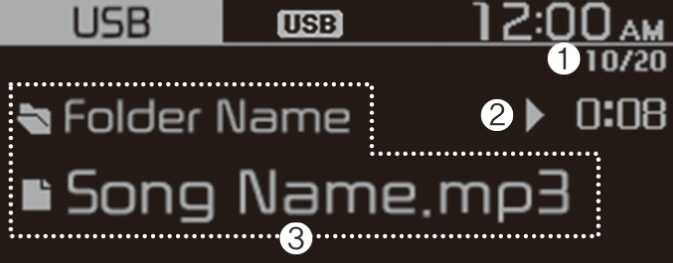
-
Current file number and total number of files
-
Playback time
-
Information about the song currently playing
Press the [ MENU/CLOCK] button on the control panel to access the following menu options:
-
List: Access the file list.
-
Folder list: Access the folder list.
-
Information: Display information about the song currently playing.
-
Sound settings: You can change the settings related to sounds, such as location where sound will be concentrated and the output level for each range.
-
Position: Select a location where sound will be concentrated in the vehicle. Select Fade ( Fader) or Balance, turn the [ TUNE] knob to select the desired position, and then press the knob. To set sound to be centred in the vehicle, select Centre ( Center).
-
Equaliser ( Tone): Adjust the output level for each sound tone mode.
-
Speed dependent vol.: Set the volume to be adjusted automatically according to your driving speed.
NOTE-
Depending on vehicle models or specifications, available options may vary.
-
Depending on the system or amplifier specifications applied to your vehicle, available options may vary.
-
-
Song information ( Media Display): Select information such as Folder/File or Artist/Title /Album to display when playing MP3 files.
-
Mode popup: Set to display mode selection window when the [ AUDIO] button is pressed on the control panel.
-
Date/Time: You can change the date and time that are shown on the system display.
-
Set date: Set date to display on the system display.
-
Set time: Set time to display on the system display.
-
Time format: Select to display time in the 12 hour format or the 24 hour format.
-
Display ( Power Off): Set to display the clock when the system power is off.
-
-
Language: You can change the display language.