
Lane Following Assist settings
Turning Lane Following Assist On/Off
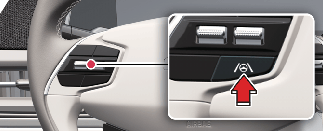
With the vehicle on, shortly press the Lane Driving Assist button located on the steering wheel to turn on Lane Following
Assist. The gray or green ( ) indicator light will appear on the cluster.
Press the button again to turn off the function.
Warning Methods
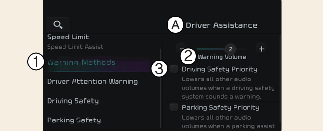
A: Driver Assistance
-
Warning Methods
-
Warning Volume
-
Driving Safety Priority
You can adjust the Warning Methods with the EV button in the ON position.
-
Warning Volume: Select Setup → Vehicle → Driver Assistance → Warning Methods on the Infotainment system.
-
Driving Safety Priority: Select Setup → Vehicle Settings → Driver Assistance → Warning Methods → Driving Safety Priority on the Infotainment system. For safe driving, the audio volume will temporarily decrease to warn the driver with the audible warning.

-
Changing the Warning Methods may also change the Warning Methods of other driver assistance systems. Please ensure and change it.
-
Warning Methods will maintain its last setting even if the vehicle is restarted.
-
The setting menu may not be available for your vehicle depending on the vehicle features and specifications.
-
Descriptions of each Driver Assistance system may be slightly different from the owner's manual after updating the software of your infotainment system. In this case, scan the QR code in the infotainment system manual to access the web manual for checking the changes.
-
Depending on your region or update, the menu may be displayed as 'Warning Sound' or 'Warning Methods'.