
Transmission ranges
The indicator in the instrument cluster displays the shift lever position when the ignition switch is in the ON position.
P (Park)
Always come to a complete stop before shifting into P (Park).
To shift from P (Park), you must depress firmly on the brake pedal and make sure your foot is off the accelerator pedal.
If you have done all of the above and still cannot shift the lever out of P (Park), see "Shift-Lock Release" in this chapter.
The shift lever must be in P (Park) before turning the engine off.

-
Shifting into P (Park) while the vehicle is in motion may cause you to lose control of the vehicle.
-
After the vehicle has stopped, always make sure the shift lever is in P (Park), apply the parking brake, and turn the engine off.
-
When parking on an incline, block the wheels to prevent the vehicle from rolling down.
-
For safety, always engage the parking brake with the shift lever in the P (Park) position except for the case of emergency parking.
R (Reverse)
Use this position to drive the vehicle backward.

Always come to a complete stop before shifting into or out of R (Reverse); you may damage the transmission if you shift into R (Reverse) while the vehicle is in motion.
N (Neutral)
The wheels and transmission are not engaged.
Do not shift into gear unless your foot is firmly on the brake pedal. Shifting into gear when the engine is running at high speed can cause the vehicle to move very rapidly. You could lose control of the vehicle and hit people or objects.
Do not drive with the shift lever in N (Neutral).
The engine brake will not work and lead to an accident.
Parking in N (Neutral) gear
Follow below steps when parking and you want the vehicle to move when pushed.
-
After parking your vehicle, step on the brake pedal and move the shift lever to P (Park) with the ignition button in ON or while the engine is running.
-
If the parking brake is applied unlock the parking brake.
-
For EPB (Electronic Parking Brake) equipped vehicles, push the brake pedal with the ignition switch or ENGINE START/STOP button in ON or while the engine is running to disengage the parking brake. If AUTO HOLD function is used while driving (If AUTO HOLD indicator is on in the cluster), press AUTO HOLD switch and AUTO HOLD function should be turn off.
-
-
while pressing the brake pedal, turn the ignition button OFF.
-
For smart key equipped vehicles, the ignition switch can be moved to OFF only when the shift lever is in P (Park).
-
-
Change the gear shift lever to N (Neutral) while pressing the brake pedal and pushing SHIFT LOCK RELEASE button or inserting, pressing down a tool (e.g., flathead screw-driver) into the SHIFT LOCK RELEASE access hole at the same time. Then, the vehicle will move when external force is applied.
Parking In Neutral
-
With the exception of parking in neutral gear, always park the vehicle in P (Park) for safety and engage the parking brake.
-
Before parking in N (Neutral) gear, first make sure the parking ground is level and flat. Do not park in N (Neutral) gear on any slopes or gradients.
If parked and left in N (Neutral), the vehicle may move and cause serious damage and injury.
-
After the ignition switch or ENGINE START/STOP button has been turned off, the Electronic Parking Brake cannot be disengaged.
-
For EPB (Electronic Parking Brake) equipped vehicles with AUTO HOLD function used while driving, if the ignition switch or ENGINE START/STOP button has been turned OFF, the Electronic Parking Brake will be engaged automatically. Therefore, AUTO HOLD function should be turned off before the ignition button is turned off.
D (Drive)
This is the normal driving position. The transmission will automatically shift through a 6 gear sequence, providing the best fuel economy and power.
For extra power when passing another vehicle or driving uphill depress the accelerator pedal further until you feel the transmission downshift to a lower gear.
To stop the vehicle during driving, please press brake pedal fully to prevent unintended movement.
Manual mode
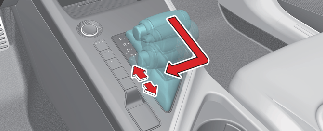
Whether the vehicle is stationary or in motion, manual mode is selected by pushing the shift lever from the D (Drive) position into the manual gate. To return to D (Drive) range operation, push the shift lever back into the main gate.
Manual mode manages the driving dynamics by automatically adjusting the steering effort, and the engine and transmission control logic for enhanced driver performance.
In manual mode, moving the shift lever backwards and forwards will allow you to make gearshifts rapidly. In contrast to a manual transmission, the manual mode allows gearshifts with the accelerator pedal depressed.
-
Up (+): Push the lever forward once to shift up one gear.
-
Down (-): Pull the lever backwards once to shift down one gear.

-
Only the six forward gears can be selected. To reverse or park the vehicle, move the shift lever to the R (Reverse) or P (Park) position as required.
-
Downshifts are made automatically when the vehicle slows down. When the vehicle stops, 1st gear is automatically selected.
-
When the engine rpm approaches the red zone the transmission will upshift automatically.
-
If the driver presses the lever to + Up) or - (Down) position, the transmission may not make the requested gear change if the next gear is outside of the allowable rpm range.