
Lane Keeping Assist settings
Lane Safety
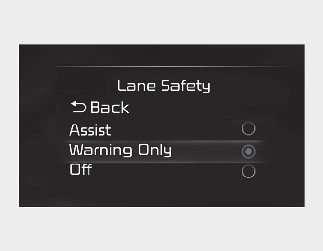
With the vehicle on, select User Settings → Driver Assistance → Driving Safety → Lane Safety on the instrument cluster or Setup → Vehicle → Driver Assistance → Driving Safety on the infotainment system.
-
Lane Safety: When lane departure is detected, the system assists with steering to prevent leaving the lane, and if lane departure occurs, it alerts the driver with an audible sound. If Lane safety is deselected, the yellow indicator light (
 ) will appear on the cluster.

-
Lane Keeping Assist does not control the steering wheel when the vehicle is driven in the middle of the lane.
-
The driver should always be aware of the surroundings and steer the vehicle if Lane safety is deselected.

By pressing the Lane Driving Assist button ( ), the Lane Keeping Assist will be turned off, and it will also deactivate the Lane Safety.
Warning Methods
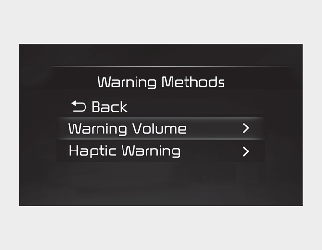
The Warning Methods can be set with the vehicle on. Select User Settings → Driver Assistance → Warning Methods from the settings menu in the instrument cluster or Setup → Vehicle → Driver Assistance → Warning Methods from the settings menu in the infotainment system to change the following settings:
-
Warning Volume: Adjusts the volume of the warning sound.
-
Haptic Warning: Activate the steering wheel vibration warning. (if equipped)
-
Driving Safety Priority: Lowers all other audio volumes when the Driving Safety system sounds a warning.
-
If you change the Warning Methods, it can be applied to each function of the driver assistance system. Please check and change it in each function.
-
If the vehicle is restarted, Warning Methods will maintain the last setting.
-
The setting menu may not exist based on vehicle specification.
-
The Warning Volume and Haptic Warning cannot be turned off at the same time. When one of the warning is turned off the other is activated.