

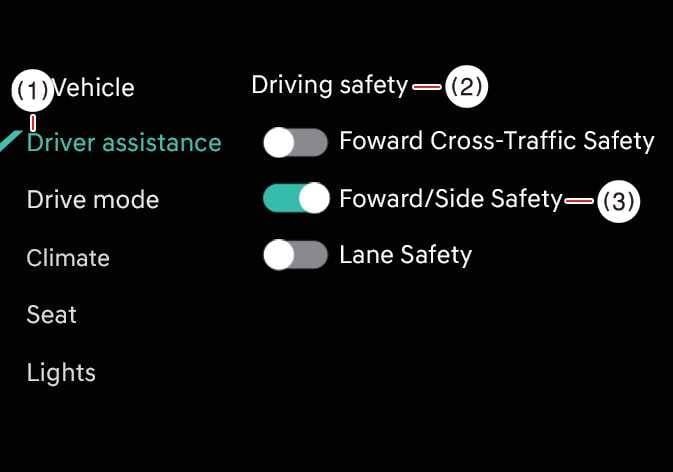
Forward/Side Safety: (if equipped)
 OCL4M055116N |
|
While the vehicle is ON, tap on the infotainment system screen to change the Forward/Side Safety settings.
Forward/Side Safety: Collision warning or emergency steering may assist the driver in a collision-imminent situation. If you deselect the setting, Forward safety will turn off and the Emergency steering warning light ( ) will appear on the cluster.
You can monitor Forward Collision-Avoidance Assist setting status on the Settings menu of the infotainment system screen. If the Forward Safety warning light ( ) or Emergency steering warning light () remains ON when Forward safety or Forward/Side safety is selected, have the vehicle inspected by an authorized Kia dealer.
Even when Forward safety is turned ON, it is the driver’s responsibility to remain alert and in control of the vehicle. However, if Forward safety is turned OFF, the system will be unable to provide assistance.
-
Steering wheel vibration can be turned ON or OFF.
-
Forward Safety settings include the “Basic,” “Junction Turning,” and “Direct Oncoming” functions. Forward Cross-Traffic Safety includes the “Junction Crossing” function. Forward/Side Safety includes the “Lane Change Oncoming”, “Lane Change Side”, and “Evasive Steering Assist” functions.: (if equipped)
-
If Forward Safety is set to OFF, even if Forward Cross-Traffic Safety and Forward/Side Safety are selected, “Junction Crossing” function will not operate.: (if equipped)