

Driver’s side
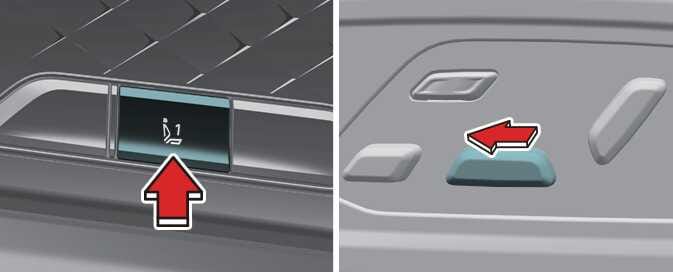 OMQ4023015_2 |
-
Open the driver’s side door when the vehicle is stopped and the vehicle in ON position.
-
Use the seat adjustment switch and the seatback angle adjustment switch to move the seat and raise the seatback angle as far forward as possible.
-
Press the Driver 1 switch from the integrated memory system and push the front portion of the driver’s seat forward/backward adjustment switch (the direction to move the seat position forward) at the same time for approximately 2 seconds.
The initialization process are as follows.
-
A beep sounds to indicate the beginning of the initialization process.
-
The seat and seatback automatically move to the rear. A beep sounds continuously during operation.
-
The seat and seatback move back to the center. A beep sounds to indicate the end of the initialization process.
The initialization process is interrupted in the following situations:
-
A problem occurs in the integrated memory system
-
You press the driver side seat adjustment switch
-
The vehicle’s speed is above 2 mph (3 km/h)
-
You close the driver side door
Before initializing, ensure that there are no obstacles around the driver’s seat.
-
If driver’s seat operation and the beep sound both stop during initialization, restart the initialization process.
-
After initializing, adjust the seat to suit the driver and save it to the driving position memory system again.