

Ergo-Motion Seat modes
Comfort stretching
 OMQ4023017 |
-
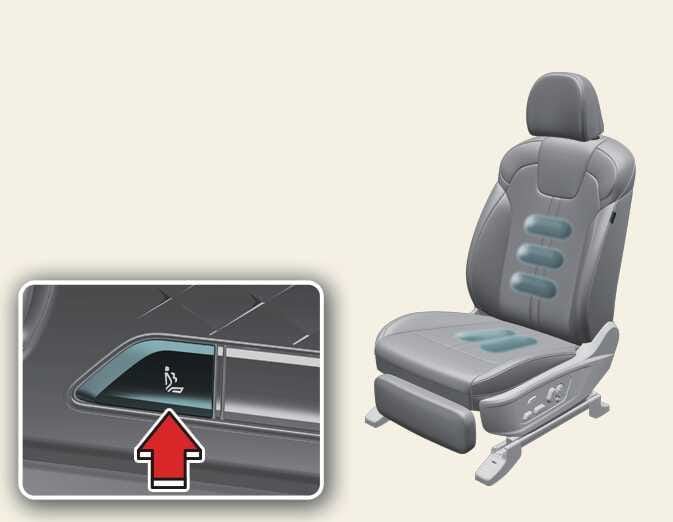
When you press the comfort stretch control switch on the driver’s door, the mode displays on the infotainment system screen and changes in the following order:
-
Pelvic: The cushion part moves to help the pelvis move back and forth.
-
Lumbar: The lumbar support moves to help exercise the back and front of the waist.
-
Whole body: The cushion and lumbar support move sequentially to help the whole body exercise and relieve fatigue.
-
Off: Disable the comfort stretching function.
-
-
To turn off comfort stretching, press the switch for approximately 1 second or longer.
-
To stop the operation of the comfort stretching function, press any of the seat adjustment switches (cushion support, lumbar support, or bolster adjustment device).
-
Select from the infotainment system to change the intensity and duration of the comfort stretching feature.
-
Intensity: Normal or Strong
-
Duration: Short (10 min.) / Normal (15 min.) / Long (20 min.)
-
Posture assist
After you drive for about an hour with your seat belt fastened, the posture assist function turns on automatically to assist your posture by adjusting the hip and waist parts of the driver’s seat.
-
Select from the infotainment system.
-
To stop operating posture assist, press the seat adjustment switch (cushion support, lumbar support, or bolster adjustment device).
The posture assist function operates automatically when the following conditions are satisfied:
-
The vehicle is in ON position
-
You fasten the seat belt of the driver side seat
Lumbar Stabilization System while driving
This function repeats the adjustment of the lumbar support in a regular pattern to reduce back fatigue when you drive continuously for a long time.
Activates automatically after 30 minutes or 1 hour of continuous driving.
-
Select from the infotainment system.
-
If you press the lumbar support adjustment switch while the lumber support function is operating while driving, the operation stops.