

Front view
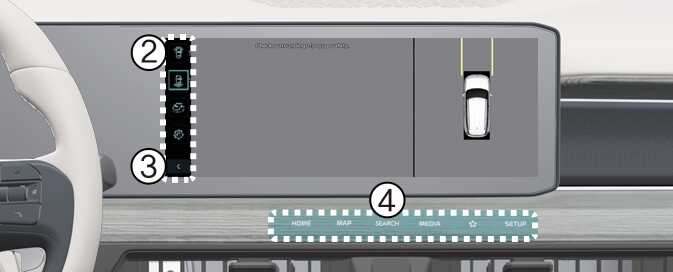
The front view function displays the vehicle's front situation on the navigation system according to the driver's settings, assisting in safe driving.
Parking
While parking, the front view of the Surround View Monitor is activated in the following conditions:
-
P (Park) or N (Neutral) or D (Drive) position with a vehicle speed slower than 6 mph (10 km/h), Pressing the Parking/View button (1).
-
Shifting from R (Reverse) to N (Neutral) or D (Drive).
-
When the automatic activation function of the Surround View Monitor is enabled
Pressing the view switching button (2) on the Surround View Monitor to select the Top View, Front View, Side View, or Wide View.
While parking, the front view of the Surround View Monitor will be turned off in the following conditions:
-
Shifting to P (Park) or R (Reverse)
-
Pressing the Parking/View button (1)
-
Pressing the back button (3) on the Surround View Monitor screen
-
Pressing the infotainment system power button (4)
-
Driving faster than 6 mph (10 km/h)
When the front view is activated, the last used view is displayed.