

1. Getting ready to remotely move forward and backward
There are two ways to operate Remote Operation function.
Method (1): Using the function with vehicle off
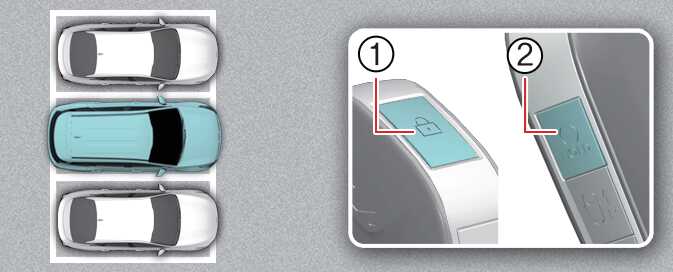 ONQ5H054082_2 |
-
Within a certain range from the vehicle press the door lock button (
 ) (1) on the smart key and lock all doors.
 -
Press and hold the Remote Start button (
 ) (2) within 4 seconds until the vehicle starts.
For more details on remotely starting the vehicle, refer to Using the smart key.
Method (2): Using the function with vehicle on
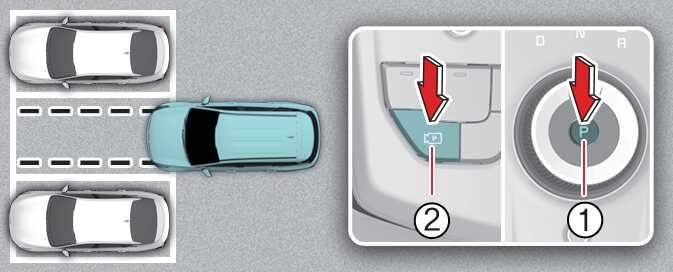 ONQ5055201R_2 |
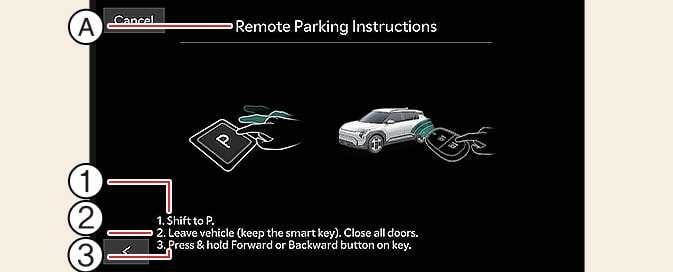 ONQ5055098L |
A: Remote Parking Instructions
-
Park the vehicle in front of the space where you want to use Remote Operation function, and shift the gear to P (Park).
-
Press and hold the Parking/View button (
 ) to turn on Smart Parking Assist. A message Under REMOTE control will appear on the infotainment system screen.
 -
Get out of the vehicle with the smart key and close all doors.
-
Agree must be selected on the infotainment system screen and the infotainment system has to operate properly to use Remote Operation function.
-
Before initiating the Remote Operation function from outside the vehicle, make sure not to leave any smart keys inside the vehicle.
-
The Remote Operation function will not work if there is a spare smart key inside the vehicle.