

Rear View Monitor settings
Warning Methods
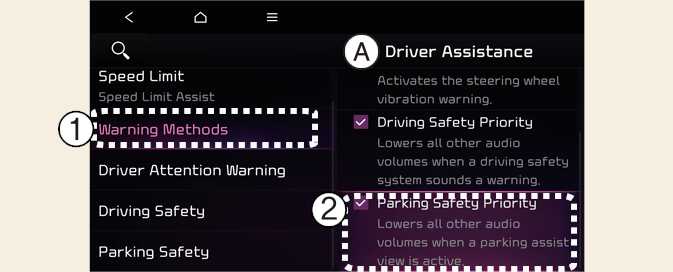
A: Driver Assistance
-
Warning Methods
-
Parking Safety Priority
Warning Methods can be set when the vehicle is in ON position.
-
Parking Safety Priority: Select Settings→ Driver Assistance → Warning Methods → Parking Safety Priority on the infotainment system. For safe parking, the audio volume will temporarily decrease while Rear View Monitor is operating.
-
Ensure that Warning Methods you have set may apply to the Warning Methods of other driver assistance systems.
-
Warning Methods will maintain its last setting even if the vehicle is restarted.
-
The setting menu may not be available for your vehicle depending on the vehicle features and specifications.
Camera settings
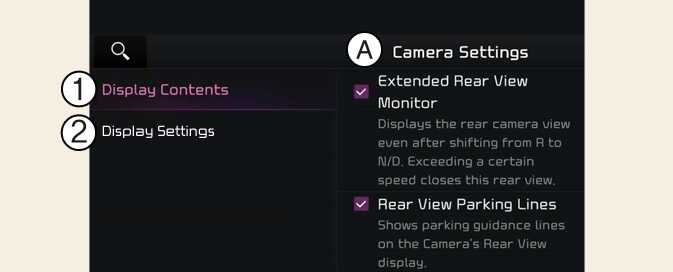
A: Camera Settings
-
Display Contents
-
Display Settings
You can change Rear View Monitor 'Display Contents' by touching the setup icon (
 ) on the screen while Rear View Monitor is operating, or touching
Settings →
Vehicle →
Driver assistance →
Parking safety →
Camera settings on the infotainment system
) on the screen while Rear View Monitor is operating, or touching
Settings →
Vehicle →
Driver assistance →
Parking safety →
Camera settings on the infotainment system
-
Display Contents: To change the settings of Rear view parking guide and Extended rear camera use.
-
Display Settings: To change the screen's brightness and contrast.
The settings menu may not be depending on the specifications of the vehicle specifications.