

Pairing devices with your system
For Bluetooth connections, first pair your device with your system to add it to the system’s list of Bluetooth devices. You can register up to five devices.
-
From the control panel, press the [ PHONE] button, and then select Phone settings ▶ Add new device.
-
If you are pairing a device with your system for the first time, or if there are no connected devices than you can also press the Call/Answer button on the steering wheel to initiate pairing.
-
-
On the Bluetooth device you want to connect, activate Bluetooth, search for your vehicle’s system, and then select it.
-
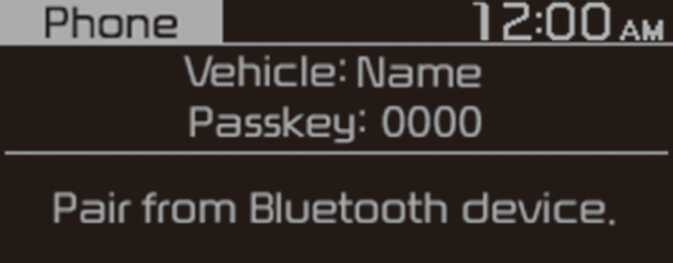
Check the system’s Bluetooth name, which is displayed in the new registration pop-up window on the system screen.
 CCJ4M010EE
 -
-
Enter or confirm the passkey to confirm the connection.
-
If the passkey input screen is displayed on the Bluetooth device screen, enter the passkey ‘0000’ which is displayed on the system screen.
-
If the 6-digit passkey is displayed on the Bluetooth device screen, ensure that the Bluetooth passkey displayed on the Bluetooth device is the same as the passkey on the system screen and confirm the connection from the device.
-
-
The screen image in this manual is an example. Check your system screen for the exact vehicle name and Bluetooth device name.
-
The default passkey is ‘0000’.
-
It may take a whilst for the system to connect with the device after you permit the system to access the device. When a connection is made, the Bluetooth status icon appears at the top of the screen.
-
You can change the permission settings via the mobile phone’s Bluetooth settings menu. For more information, refer to your mobile phone’s user guide.
-
To register a new device, repeat steps 1 to 3.
-
If you use the automatic Bluetooth connection function, a call may be switched to the vehicle’s Handsfree when you are taking on the phone near the vehicle whilst the vehicle’s engine is on. If you do not want the system to connect with the device automatically, deactivate Bluetooth on your device.
-
When a device is connected to the system via Bluetooth, the device’s battery may discharge faster.