
Lane Keeping Assist settings
Lane safety
A: Driver Assistance
-
Driving Safety
-
Lane Safety
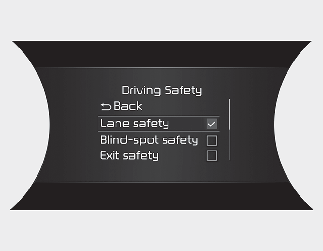
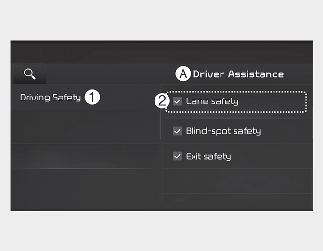
With the vehicle on, select Settings → Driver Assistance → Driving Safety on the instrument cluster or Settings → Vehicle → Driver Assistance → Driving Safety on the infotainment system.
-
Lane Safety: If Lane safety is selected, Lane Keeping Assist will automatically assist the driver's steering when lane departure is detected to help prevent the vehicle from moving out of its lane. If Lane safety is off, the yellow indicator light (
 ) will appear on the cluster.

-
Lane Keeping Assist does not control the steering wheel when the vehicle is driven in the middle of the lane.
-
The driver should always be aware of the surroundings and steer the vehicle if Lane Safety is deselected.
Warning Methods
A: Driver Assistance
-
Warning Methods
-
Warning Volume
-
Driving Safety Priority
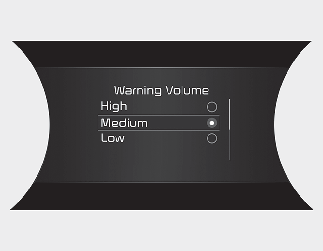
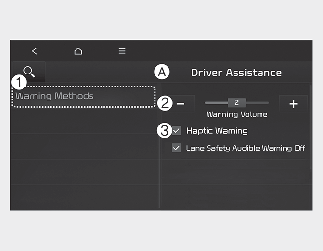
With the vehicle on, select Settings → Driver Assistance → Warning Volume on the instrument cluster or Settings → Vehicle → Driver Assistance → Warning Methods on the infotainment system to change the Warning Sound.
-
Warning Volume: You can adjust the Warning Volume from level 1 to 3.
-
Driving Safety Priority: For safe driving, the audio volume will temporarily decrease to warn the driver with the audible warning.

-
Ensure that Warning Methods you have set may apply to the Warning Methods of other Driver Assistance systems.
-
Warning Methods will maintain its last setting even if the vehicle is restarted.
-
The setting menu may not be available for your vehicle depending on the vehicle features and specifications.