
Indstillinger for forrudedisplay
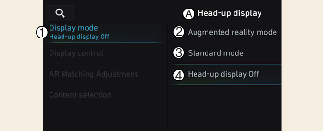
A: Forrudedisplay
-
Display-tilstand
-
Augmented reality-tilstand
-
Standardtilstand
-
Forrudedisplay slukket
Forrudedisplay kan aktiveres fra menuen Indstillinger på infotainment-systemskærmen. Vælg enten AR-tilstand (Augmented Reality) eller standardtilstand ved at vælge:
-
Indstillinger → Køretøj → Forrudedisplay → Skærmens tilstand → Augmented reality-tilstand/Standardtilstand
Når du har aktiveret forrudedisplayet, kan du ændre indstillingerne for Display Kontrol, Kalibrering af Augmented reality og Indholdsvalg på Forrudedisplayet.