
Blind-Spot Collision Warning/Blind-Spot Collision Avoidance Assist setting and activation
Blind-Spot Collision Warning/Blind-Spot Collision Avoidance Assist setting
-
The driver can activate the function by placing the START/STOP button to the ON position and by selecting "User settings → Vehicle → Driver assistance → Blind-spot safety".
-
Blind-Spot Collision Avoidance Assist and Blind-Spot Collision Warning turn on and get ready to be activated when 'Active assist' is selected. Then, if a vehicle approaches the driver's blind spot area a warning sounds or braking power is applied.
-
Blind-Spot Collision Warning turns on and gets ready to be activated when 'Warning only' is selected. Then, if a vehicle approaches the driver's blind spot area a warning sounds.
-
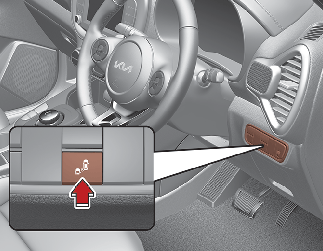
The function is deactivated and the indicator on Blind-Spot Safety button is extinguished when 'Off' is selected.
-
-
If you press Blind-Spot Safety button whilst 'Active assist' or 'Warning only' is selected the indicator on the button extinguishes and the function deactivates.
-
If you press Blind-Spot Safety button whilst the function is cancelled the indicator on the button illuminates and the function activates. In this case, the function returns to the state before the motor turned off. When the function is initially turned on and when the motor is turned off then on again whilst the function is in activation, the warning light will illuminate for 3 seconds on the outside rearview mirror.
-
If the motor is turned off then on again, the function maintains the previous state.
-
The driver can select the initial warning activation time in the User Settings by selecting "User settings → Vehicle → Driver assistance → Warning timing"
-
The options for the initial BlindSpot Collision Warning includes the following:
-
Normal:
When this condition is selected, the initial Blind-Spot Collision Warning is activated normally. If this setting feels too sensitive change the option to 'later'.
The warning activation time may feel late if the side/rear vehicle abruptly accelerates.
-
Later:
Select this warning activation time when the traffic is light and you are driving in a low speed. However, if you change the warning activation time, the warning activation time of vehicle's other function may also change. Check the warning activation time before changing it.
-
Operating Conditions
The function enters the ready status, when 'Active assist' or 'Warning only' is selected and the following conditions are satisfied:
Active Assist
-
Collision-Avoidance Assist will activate when:
-
Vehicle speed is between 40 ~110 mph (60~10 km/h).
-
The function detects both of the lane lines.
-
An approaching vehicle is detected next to or behind your vehicle.
-
-
Collision Warning will activate when:
The vehicle speed is above about 20 mph (30 km/h).
Warning Only
-
Collision Warning will activate when:
-
The vehicle speed is above 20 mph (30 km/h).
* If `Warning only` is selected, braking is not assisted.
-