
Rear View Monitor settings
Warning Methods
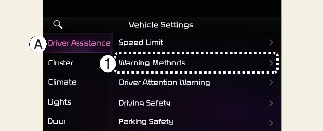
A: Driver Assistance
-
Warning Methods
The Warning Methods can be set with the vehicle on. Select Setup → Vehicle → Driver Assistance → Warning Methods from the settings menu in the infotainment system to change the following settings:
-
Parking Safety Priority: Lowers all other audio volumes when Rear View Monitor is active.

-
If you change the Warning Methods, it can be applied to each function of the driver assistance system. Please check and change it in each function.
-
If the vehicle is restarted, Warning Methods will maintain the last setting.
-
The setting menu may not exist based on vehicle specification.
Camera Settings
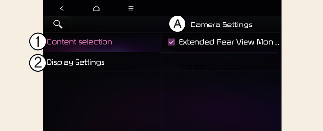
A: Camera Settings
-
Content selection
-
Display settings
With the vehicle on, select the setup icon ( ) on the screen or Setup → Vehicle → Driver Assistance → Parking Safety → Camera Settings from the infotainment system screen to change the Rear View Monitor settings.
Extended Rear View Monitor
If Extended Rear View Monitor use is selected, the rear camera is displayed even when shifting from R (Reverse) to N (Neutral) or D (Drive).
Rear View Parking Guidance
If Rear View Parking Guidance in the display information is selected, Rear View Parking Guidance are displayed in the rear monitor.
Display settings
You can set the brightness (day/night) and contrast of the camera image in Display settings.
The setting menu may not be available for your vehicle depending on the vehicle specifications.
-
The horizontal guideline of the rear view parking guide lines is based on the empty freight condition. This shows the distance of about 0.5 m (20 in.), 1 m (40 in.) and 2.3 m (91 in.) from the vehicle.
-
The horizontal guideline of the rear top view guide lines is based on the empty freight condition. This shows the tailgate opening distance and the distance of about 1.5 m (60 in.) from the vehicle.