

With the mechanical key
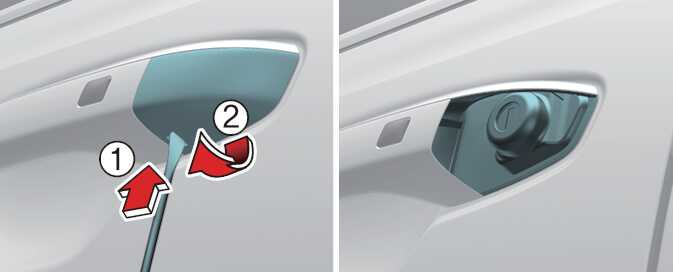 OMQ4033467_2 |
-
Press the lever (1) located inside the bottom part of the cover (2) with a key or flat-head screwdriver.
-
Push out the cover (2) while pressing the lever.
-
Turn the key toward the rear of the vehicle to unlock and toward the front of the vehicle to lock (only the driver’s door can be locked/unlocked)
-
You can also lock and unlock doors with the smart key.
-
Once the doors are unlocked, you can open them by pulling the door handles.
-
When closing a door, push the door by hand. Make sure that all the doors are closed securely.
-
Be aware that the mechanical key can only lock/unlock the driver’s door.
-
To lock all doors, operate the central lock switch inside the vehicle. Open the car door using the inner handle, then close the door and lock the driver’s door with a mechanical key.
-
Refer to Operating door locks from inside the vehicle to lock the doors from inside the vehicle.
-
Be careful not to lose or scratch the key cover when removing it.
-
When the key cover freezes and does not open, tap it lightly or indirectly warm (hand temperature, etc.) it up.
-
Do not apply excessive force to the door or door handle. This may cause damage.