
High Beam Assist (HBA) (if equipped)
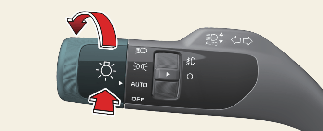
High Beam Assist is a function that automatically adjusts the headlamp range (switches between high beam and low beam) depending on the brightness of detected vehicles and certain road conditions.
Detecting sensor
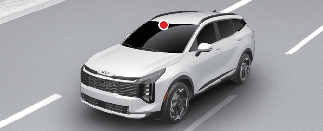
The front view camera is used as a detecting sensor to detect ambient light and brightness while driving.
Refer to the picture above for the location of the front view camera.

-
Always keep the front view camera in good condition to maintain optimal performance of HBA.
-
For more details on the precautions of the front view camera, refer to More Details.
HBA setting
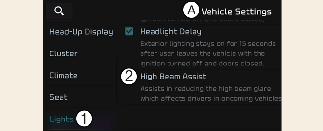
A: Vehicle Settings
-
Lights
-
High Beam Assist
With the vehicle in the ON position, select Setup → Vehicle → Lights → High Beam Assist from the Settings menu to turn on High Beam Assist and deselect to turn off the function.

For your safety, adjust your high beam settings only after parking the vehicle at a safe location.
High Beam Assist operation
Display and control
-
After selecting 'High Beam Assist' in the Settings menu, HBA will operate by following the procedure below.
-
Place the headlamp switch in the AUTO position and push the headlamp lever towards the instrument cluster. The HBA (
 ) indicator light will appear on the cluster and the function will be enabled.
-
When the function is enabled, high beam will turn on when vehicle speed is above 20 mph (30 km/h). When vehicle speed is below 12 mph (20 km/h), high beam will not turn on, the white High Beam (
 ) indicator lights will appear on the cluster.
-
The High Beam (
) indicator light will appear on the cluster when the high beam is on.
-
-
When HBA is operating, if the headlight lever or switch is used, the function operates as follows:
-
If the headlamp lever is pulled towards you when the high beam is off, the high beam will turn on without HBA canceled. When you let go of the headlamp lever, HBA will turn on again.
-
If you push the light switch towards the instrument cluster, the high beam is turned on and HBA is released.
-
If the headlamp lever is pulled towards you when the high beam is on via HBA, the low beam will be on, and the function will turn off.
-
If the headlamp switch is placed from AUTO to another position (headlamp/position/off), High Beam Assist will turn off and the corresponding lamp will turn on.
-
-
When HBA is operating, high beam switches to low beam if any of the following conditions occur:
-
When the headlamps of an oncoming vehicle are detected.
-
When the taillamp of a vehicle in front is detected.
-
When the headlamp or taillamp of a motorcycle or a bicycle is detected.
-
When the surrounding ambient light is bright enough that high beams are not required.
-
When streetlights or other lights are detected.
-
Malfunction and limitations
Malfunction
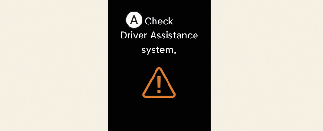
A: Check Driver Assistance system
When HBA is not working properly, the Check High Beam Assist (HBA) system warning message will appear and warning light ( ) will appear on the cluster. Have the function inspected by an authorized Kia dealer.
Limitations
HBA may not work properly in the following situations:
-
Light from a vehicle is not detected because of lamp damage, or because it is hidden from sight, etc.
-
The headlamps of a vehicle are covered with dust, snow or water.
-
A vehicle's headlamps are off, but the fog lamps are on. etc.
-
There is a lamp that has a similar shape to a vehicle's lamp.
-
Headlamps have been damaged or not repaired properly.
-
Headlamps are not aimed properly.
-
Driving on a narrow curved road, rough road, uphill or downhill.
-
A Vehicle in front is partially visible on a crossroad or curved road.
-
There is a traffic light, reflecting sign, flashing sign or mirror ahead.
-
There is a temporary reflector or flash ahead (construction area).
-
The road conditions are poor such as being wet, iced or covered with snow.
-
A vehicle appears from a curve.
-
The vehicle is tilted from a flat tire or is being towed.
-
Light from a vehicle is not detected because of exhaust fumes, smoke, fog, snow, etc.
-
When the lighting switch is not in the AUTO position.
-
When the high beam assist function is turned off.
-
When the vehicle speed is reduced to 35 km/h or lower.
-
Depending on the instrument cluster specification or theme, images or colors may be displayed differently.
-
For more details on the limitations of the front view camera, refer to More Details.
-
At times, HBA may not work properly. The function is for your convenience only. It is the responsibility of the driver for safe driving practices and to always check the road conditions for your safety.
-
When HBA does not operate normally, change the headlamp position manually between high beam and low beam.