

How to connect AC charger
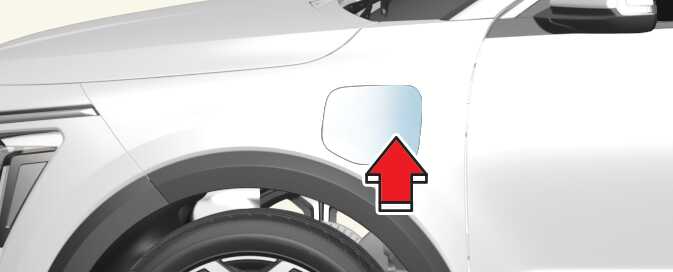
-
Depress the brake pedal and apply the parking brake.
-
Turn OFF all switches, move the shift lever or dial to P (Park), and turn OFF the vehicle.
-
Open the charging door by pressing rear center edge of the charging door.
-
Remove any dust on the charging connector and charging inlet.
-
Hold the charging connector handle.
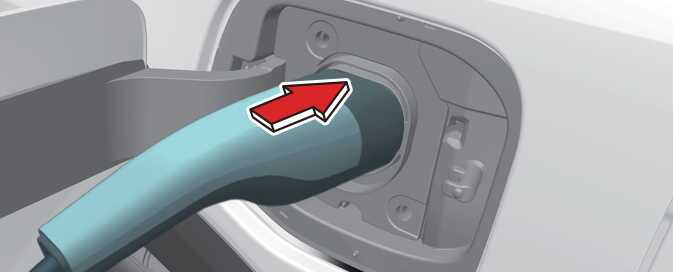 OSG2PHQ012028L
Then, insert the charger into the charging inlet until it clicks. If it is not fully connected, a bad connection between the charging connector and the charging terminals may cause a fire.
NOTEIf the charging connector and charging inlet are not connected properly, the connector may droop or vibrate. In this case, hold the charging connector handle and push it all the way in.
-
Check if the charging cable connection indicator(
 ) of the high voltage battery in the instrument cluster is turned ON.
Charging does not occur when the indicator is OFF. When the charging connector is not connected properly, reconnect the charging cable to charge.
-
The charging is in progress only with the shift lever or dial is in P (Park). Charging the battery with the ENGINE START/STOP button in the ACC position is possible. However, it may discharge the 12-V battery. Thus, if possible, charge the battery with the ENGINE START/STOP button in the OFF position.
-
Moving the shift lever or dial from P (Park) to R (Reverse)/N (Neutral)/D (Drive) stops the charging process. To restart the charging process, move the shift lever or dial to P (Park), press the ENGINE START/STOP button to the OFF position, and disconnect the charging cable. Then, connect the charging cable.
Charging connector lock mode
When the charging connector is plugged into the charging inlet, the connector lock timing varies with the modes selected by the user settings menu or the infotainment screen menu.
-
Always lock: The connector locks when the charging connector is plugged into the charging inlet.
-
Lock while charging: The connector locks when charging starts. The connector unlocks when charging is completed.
-
Do not lock: The locking device for charging inlet is kept unlocked regardless of charging status.
For more details, refer to AC charging connector lock.