

How to disconnect AC charger
-
The vehicle doors must be unlocked in order to be able to disconnect the charging connector. A lock system prevents charger cable disconnection when the vehicle's doors are locked.
NOTE
In order to disconnect the charging connector, unlock the doors to unlatch the charging connector lock system. If not, the charging connector and the vehicle's charging inlet may be damaged.
-
Hold the charging connector handle and pull it out.
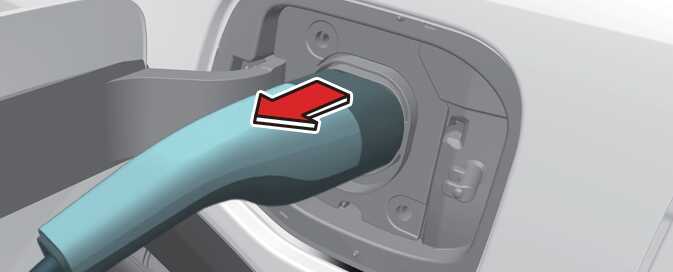 OSG2PHQ012023L
To prevent charging cable theft, the charging connector cannot be disconnected from the inlet when the doors are locked.
However, if the vehicle is in the charging connector AUTO mode, the charging connector automatically unlocks from the inlet when charging is completed.
If the connector is not automatically unlocked after charging is completed in AUTO mode, the connector is unlocked when all of the doors are unlocked.
For more details, refer to AC charging connector lock.
NOTEWhen disconnecting the charging connector, press the release button. Failure to do so may damage the charging connector and vehicle charging inlet.
-
Close the charging door by pressing the rear center edge of the charging door.
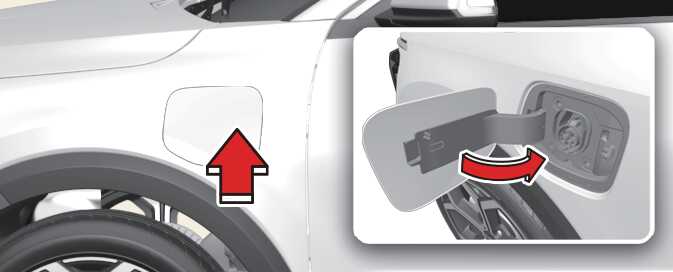 OSG2PHQ012024N
The charging door does not have a locking system.
Do not modify or disassemble the charging cable components. It may cause a fire or an electric shock with personal injury.
-
If you cannot open the charging door due to freezing weather, tap lightly or remove any ice near the charging door. Do not try to forcibly open the charging door. If you open it by force, the charging door may be damaged.
-
Keep the charging connector, plug and cable clean and dry. The charging cable should be also kept dry.
-
Use an air gun to blow any foreign substances from the charging connector and the charging plug.