
LCD display modes
|
|
|||||
|---|---|---|---|---|---|
 Trip Computer |
 Driving Assist |
 User Settings |
 Information |
 Master warning |
|
|
Up/Down |
Fuel Economy |
|
Driver Assistance |
Digital Speedometer |
The Master Warning mode displays warning messages related to the vehicle when one or more systems is not operating normally. |
|
Accumulated Info |
Cluster |
||||
|
Drive Info |
Light |
||||
|
Intelligent Speed Limit Warning |
Door |
||||
|
Convenience |
|||||
|
Units |
|||||
|
Theme Selection |
|||||
|
Language |
|||||
|
Reset |
|||||
 Mode


*: if equipped
The information provided may differ depending on which functions are applicable to your vehicle.
* For controlling the LCD modes, refer to More Details.
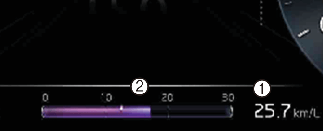
Fuel economy
-
Average fuel economy
-
Instant fuel economy
1. Average fuel economy
The average fuel economy is calculated by the total driving distance and fuel consumption since the last average fuel economy reset.
-
At vehicle start: The information will automatically reset when the driver's door is opened after the vehicle is turned off, or approximately 3 minutes have passed after the vehicle is turned off.
-
After refueling: After refueling more than 6 liters (1.5 gallons) and driving over 1 km/h (1 mph), the vehicle will reset to default automatically.
-
Manually: Press and hold the OK button on the steering wheel when the average fuel economy is displayed.
2. Instant fuel economy
Displays the instant fuel economy during the last few seconds when the vehicle speed is more than approximately 10 km/h (6 mph).

This information is always displayed at the bottom center of the Full LCD cluster.
Driving Assist mode 
This mode displays the state of:
-
Forward Collision-Avoidance Assist
Lane Keeping Assist
Blind-Spot Collision-Avoidance Assist
Smart Cruise Control
Lane Following Assist
-
Driver Attention Warning
Trip computer mode 
* You may change through items in the following order.
Drive info
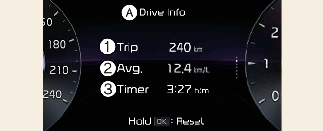
A: Drive info
-
Accumulated trip distance
-
Average fuel efficiency
-
Total driving time
The information after one ignition cycle.
Drive Info screen will reset when the driver's door is opened after turning off the vehicle, or the vehicle is turned on after 3 minutes have passed.
To manually reset the information, press and hold the OK button on the steering wheel when viewing the Drive info.
Since refueling
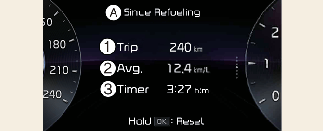
A: Since refueling
-
Accumulated trip distance
-
Average fuel efficiency
-
Total driving time
The information after refueling.
To manually reset the information, press and hold the OK button on the steering wheel when viewing the Since refueling.
Accumulated info
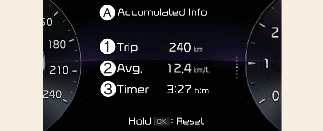
A: Accumulated info
-
Accumulated trip distance
-
Average fuel efficiency
-
Total driving time
The information is accumulated starting from the last reset.
To manually reset the information, press and hold the OK button on the steering wheel when viewing the Accumulated Info.
-
The average fuel economy is not displayed for more accurate calculation if the vehicle does not drive more than 10 seconds or approximately 50 m (0.03 miles) since the vehicle is in ON position.
-
Fuel efficiency is calculated after the vehicle has run for more than 300 meters.
-
The information will be accumulated even if the engine is running and the vehicle is not in motion.
Turn By Turn (TBT) mode 
This mode displays the Navigation status.
Information mode 
Digital speedometer
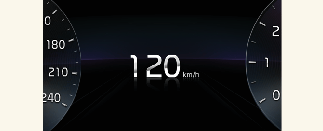
Indicates the speed of the vehicle.
Master warning mode 
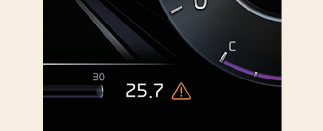
This mode informs you of the following situations:
-
Driver assistance system malfunction, limitation or radar/camera blockage
-
LED headlamp malfunction
-
Lamp malfunction
-
TPMS failure, low tire pressure, etc.
At this time, the Master warning light ( ) will appear. If the warning situation is solved, the master warning light will be turned off and the Master Warning icon
will disappear.
Service Interval
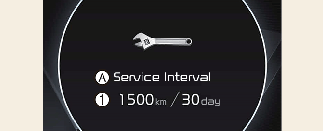
A: Service Interval
-
Service interval schedule
It calculates and displays when you need a scheduled maintenance service (mileage or days).
To reset the service interval, select Settings → Vehicle → Cluster → Service Interval → Reset.
-
If the remaining mileage or time reaches 1,500 km (900 miles) or 30 days, the message Service in is displayed for several seconds each time you set the vehicle to the ON position.
-
If you do not have your vehicle serviced according to the already inputted service interval, Service required message is displayed for several seconds each time you set the vehicle to the ON position.
-
If any of the following conditions occurs, the mileage and days may be incorrect.
-
The battery cable is disconnected.
-
The battery is discharged.
-
User settings mode
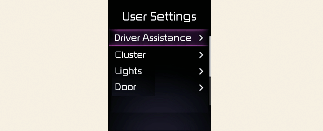
In this mode, you can change the settings of the instrument cluster, doors, lamps, etc.
-
Driver Assistance
-
Cluster
-
Light
-
Door
-
Convenience
-
Units
-
Language
-
Reset
The information provided may differ depending on which functions are applicable to your vehicle.
Shift to P to edit settings/Engage parking brake to edit settings
This warning message appears if you try to adjust the User Settings while driving.
-
Dual Clutch Transmission
For your safety, change the User Settings after parking the vehicle, applying the parking brake and moving the shift lever to P (Park).
-
Manual Transmission
For your safety, change the User Settings after engaging the parking brake.
1. Driver Assistance (if equipped)
|
Items |
Explanation |
|---|---|
|
Driving Convenience |
* For more details, refer to More Details.
|
|
Speed Limit |
* For more details, refer to More Details. |
|
Warning Methods |
To adjust the Warning Volume |
|
Driver Attention Warning |
* For more details, refer to More Details. |
|
Driving Safety |
* For more details, refer to More Details, More Details.
* For more details, refer to More Details.
* For more details, refer to More Details.
* For more details, refer to More Details. |
|
Parking Safety |
* For more details, refer to More Details. |
* The information provided may differ depending on which systems are applicable to your vehicle.
2. Cluster (if equipped)
|
Items |
Explanation |
|---|---|
|
Theme Selection |
|
|
AUTO STOP Timer |
|
|
Wiper/Lights Display |
To activate or deactivate Wiper/Lights Display. |
|
Traffic Signs |
To activate or deactivate Traffic Signs. |
|
Icy Road Warning |
To activate or deactivate Icy Road Warning. |
|
Welcome Sound |
To activate or deactivate Welcome Sound. |
* The information provided may differ depending on which functions are applicable to your vehicle.
3. Lights (if equipped)
|
Items |
Explanation |
|---|---|
|
Illumination |
|
|
Ambient Light Color |
To select the Ambient Light Color. |
|
One Touch Turn Signal |
* For more details, refer to More Details. |
|
Headlight Delay |
To activate or deactivate the headlight delay function. |
|
High Beam Assist |
To activate or deactivate High Beam Assist. |
* The information provided may differ depending on which functions are applicable to your vehicle.
4. Door (if equipped)
|
Items |
Explanation |
|---|---|
|
Automatically Lock |
|
|
Automatically Unlock |
|
|
Smart Tailgate |
To activate or deactivate Smart Tailgate |
* The information provided may differ depending on which systems are applicable to your vehicle.
5. Convenience (if equipped)
|
Items |
Explanation |
|---|---|
|
Rear Occupant Alert |
To activate or deactivate the Rear Occupant Alert function. |
|
Service Interval |
|
|
Welcome Light |
To select the welcome light function. |
|
Welcome Mirror |
To select the welcome mirror function. |
|
Welcome Mirror/Light |
To select the welcome mirror/light function. |
|
Auto Rear Wiper (in R) |
To activate or deactivate the Auto Rear Wiper function will be activated. |
* The information provided may differ depending on which functions are applicable to your vehicle.
6. Units (if equipped)
|
Items |
Explanation |
|---|---|
|
Speed Unit |
To select the Speed unit. |
|
Temperature Unit |
To select the Temperature unit. |
|
Fuel Economy Unit |
To select the Fuel economy unit. |
|
Tire Pressure Unit |
To select the Tire Pressure Unit |
* The information provided may differ depending on which functions are applicable to your vehicle.
7. Language
|
Items |
Explanation |
|---|---|
|
Language |
|
8. Reset
|
Items |
Explanation |
|---|---|
|
Reset |
|