
Rear View Monitor operation
Rear view
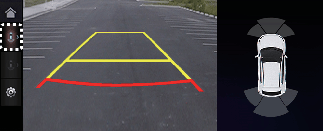
-
Shift the gear to R (Reverse), the image will appear on the screen.
-
Pressing the View icon with the Rear top view on the screen.
-
The rear view cannot be turned off when the gear is in R (Reverse).
-
Shift the gear from R (Reverse) to P (Park), the rear view will turn off.
Rear top view
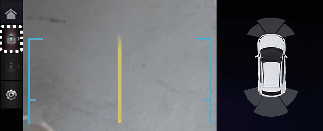
When you touch the ( ) icon, the top view is displayed on the screen and shows the distance from the vehicle in the back of your vehicle while
parking.
Extended Rear View Monitor
The rear view will maintain showing on the screen to help you when parking.
-
Shift the gear from R (Reverse) to N (Neutral) or D (Drive), the rear view will appear on the screen.
-
The vehicle speed is below approximately 10 km/h (6 mph).
-
When vehicle speed is above 10 km/h (6 mph), the rear view will turn off.
-
Shift the gear to P (Park), the rear view will turn off.
Rear view while driving
The rear view function during driving is activated under the following conditions:
-
When the gear is in N (Neutral) or D (Drive) and the vehicle speed is above 10 km/h (6 mph), pressing the Parking/View button (1)
You can select the Rear View or Rear Wide View by pressing the view change button (2) on the rear monitor screen.
The rear view function during driving is deactivated in the following cases:
-
When shifting to P (Park)
-
When pressing the Parking/View button (1)
-
When pressing the Back button (3) on the rear monitor screen
-
When operating a button on the infotainment system (4)

-
All views remain active when the gear is in ‘R’ (Reverse).
-
When the rear monitor is activated, the last used view mode is displayed.
-
Rear parking guidelines are shown in Rear View and Rear Top View modes (System → Vehicle → Driver Assistance → Parking Safety → Camera Settings → Display Info → Rear Parking Guideline). However, rear parking guidelines are not displayed in the Rear View mode while driving.
-
The rear view while driving does not turn off even if the vehicle speed drops below 10 km/h (6 mph) after activation.
-
When the rear view function is active during driving, the Rear Top View is disabled.