
Driver Attention Warning settings
Leading Vehicle Departure Alert

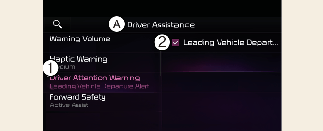
A: Driver Assistance
-
Driver Attention Warning
-
Leading Vehicle Departure Alert
With the vehicle on, select User Settings → Driver Assistance → Driver Attention Warning on the instrument cluster, or select Setup → Vehicle → Driver Assistance → Driver Attention Warning on the infotainment system.
-
Leading Vehicle Departure Alert: Driver Attention Warning will inform the driver when a detected vehicle in front departs from a stop.
-
Inattentive Driving Warning: Inattentive Driving Warning of Driver Attention Warning can be turned on or off. (except Europe)

For Europe specification
-
The Driver Attention Warning remains constantly on, and the setting menu is not shown.
Except Europe specification
-
When Inattentive Driving Warning is deselected and the vehicle is restarted, Inattentive Driving Warning is automatically selected. If you deselect to turn off the Inattentive Driving Warning, Driver Attention Warning cannot assist you. The driver should always be aware of the surroundings and drive safely.