
Smart Cruise Control operation
Operating conditions
Basic function
Smart Cruise Control operates when the following conditions are satisfied.
-
The gear is in D (Drive)
-
Your driving speed is within the operating speed range
-
10–160 km/h (5–100 mph)
-
-
ESC (Electronic Stability Control) or ABS is on
Smart Cruise Control does not operate in the following conditions.
-
The driver's door is open
-
Engine RPM is high
-
When the Electronic Parking Brake (EPB) is applied
-
ESC (Electronic Stability Control) or ABS is controlling the vehicle
-
Forward Collision-Avoidance Assist brake control is operating
-
Remote Smart Parking Assist brake control is operating (if equipped)
-
When the Idle Stop and Go (ISG) system is active
-
When the vehicle is stopped or moving at less than 10 km/h (5 mph) and there is no vehicle ahead
-
If the brake pedal is pressed while driving (except when the vehicle is stopped)
Overtake Acceleration Assist function
Overtaking Acceleration Assist will operate when the turn signal indicator is turned on to the left (left-hand drive) or turned on to the right (right-hand drive) while Smart Cruise Control is operating, and the following conditions are satisfied:
-
Your driving speed is above 60 km/h (40 mph)
-
A vehicle is detected in front of your vehicle
Overtaking Acceleration Assist does not operate in the following conditions.
-
The hazard warning flasher is on
-
Vehicle speed is reduced to maintain distance with the vehicle in front

-
When the turn signal indicator is turned on to the left (left-hand drive) or turned on to the right (right-hand drive) while there is a vehicle ahead, the vehicle may accelerate temporarily. Pay attention to the road conditions at all times.
-
Regardless of your country's driving direction, Overtaking Acceleration Assist will operate when the conditions are satisfied. When using the function in countries with different driving direction, always check the road conditions at all times.
Turning on Smart Cruise Control
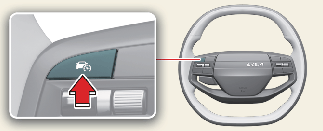
Press the Driving Assist button to turn on Smart Cruise Control. The speed will be set to the current speed on the cluster.
-
If there is no vehicle in front of you, the set speed will be maintained.
-
If there is a vehicle in front of you, the speed may be adjusted to maintain the distance to the vehicle ahead. If the vehicle ahead accelerates, your vehicle will travel at a steady cruising speed after accelerating to the set speed.

When the vehicle speed is 30 km/h (20 mph) or below if you press the Driving Assist button, the Smart Cruise Control speed will be set to 30 km/h (20 mph).
Setting vehicle distance
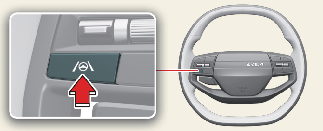
Each time the button is pressed, the headway changes as follows:
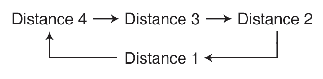
For example, if you drive at 90 km/h (56 mph), the distance is maintained as follows:
-
Distance 4: approximately 52.5 m (172 ft.)
-
Distance 3: approximately 40 m (130 ft.)
-
Distance 2: approximately 32.5 m (106 ft.)
-
Distance 1: approximately 25 m (82 ft.)
The distance is set to the last set distance when the vehicle is restarted, or when Smart Cruise Control was temporarily canceled.
Increasing set speed
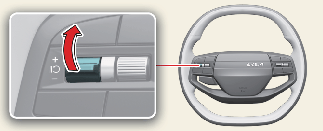
-
Push the (+) switch up and release it immediately. The set speed will increase by 1 km/h (1 mph) each time the switch is operated in this manner.
-
Push the (+) switch up and hold it. The set speed will increase by 10 km/h (5 mph) each time the switch is operated in this manner.
You can increase the set speed to 160 km/h (100 mph).
Check the driving condition before using the (+) switch. Driving speed may sharply increase when you push up and hold the (+) switch.
Decreasing set speed
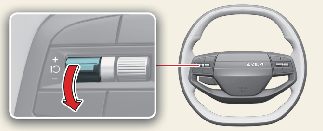
-
Push the (-) switch down and release it immediately. The set speed will decrease by 1 km/h (1 mph) each time the switch is operated in this manner.
-
Push the (-) switch down and hold it. The set speed will decrease by 10 km/h (5 mph) each time the switch is operated in this manner.
You can decrease the set speed to 30 km/h (20 mph).
Temporarily canceling Smart Cruise Control
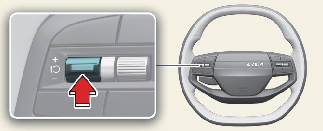
Press the ( ) switch or depress the brake pedal to temporarily cancel Smart Cruise Control.
Resuming Smart Cruise Control
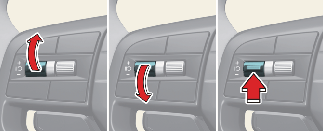
To resume Smart Cruise Control after the function was canceled, operate the (+), (-) or () switch.
If you push the (+) switch up or (-) switch down, the set speed will be set to the current speed on the cluster.
If you press the () switch, vehicle speed will resume to the preset speed.
When the accelerator pedal is pressed and the current speed is lower than the set speed, pressing the (+) or (–) switch will activate the function immediately, and the set speed will be changed to the current driving speed.
Check the driving condition before using the () switch. Driving speed may sharply increase or decrease when you press the () switch.
Turning off Smart Cruise Control
Press the Driving Assist button to turn Smart Cruise Control off.
If your vehicle is equipped with Manual Speed Limit Assist, press and hold the Driving Assist button to turn off Smart Cruise Control. However, Manual Speed Limit Assist will turn on.
Do not use the switches and buttons at the same time. Smart Cruise Control may not operate properly.
Smart Cruise Control display and control
You can see the status of the Smart Cruise Control operation in the Driving Assist view on the cluster. Refer to More Details.
Smart Cruise Control will be displayed as below depending on the status of the function.
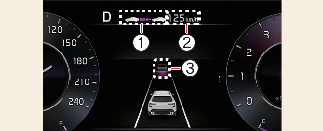
Smart Cruise Control will be displayed as below depending on the status of the function.
-
When operating
-
Whether there is a vehicle ahead and the selected distance level
-
Set speed
-
Whether there is a vehicle ahead and the target vehicle distance
-
-
When temporarily canceled
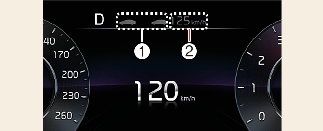
-
Your vehicle is displayed in gray.
-
The previous set speed is shaded.
-
Vehicle ahead and distance level are not displayed.
-
-
The distance of the front vehicle on the cluster is displayed according to the actual distance between your vehicle and the vehicle ahead.
-
The target distance may vary according to the vehicle speed and the set distance level. If vehicle speed is low, even though the vehicle distance has changed, the change of the target vehicle distance may be small.
-
The images or colors displayed on the cluster may vary depending on the cluster specifications or themes.
Accelerating temporarily
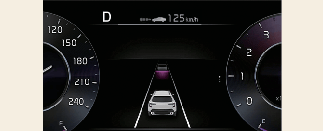
If you want to speed up temporarily without altering the set speed while Smart Cruise Control is operating, depress the accelerator pedal. While the accelerator pedal is depressed, the set speed, distance level and target distance will blink on the cluster.
However, if the accelerator pedal is depressed insufficiently, the vehicle may decelerate.
Be careful when accelerating temporarily, because the speed and distance is not controlled automatically even if there is a vehicle in front of you.
Temporarily automatic cancellation of Smart Cruise Control
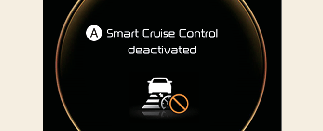
A: Smart Cruise Control deactivated
If Smart Cruise Control is temporarily canceled automatically, the warning message will appear on the cluster, and an audible warning will sound to warn the driver.
Smart Cruise Control will be temporarily canceled automatically when:
-
Your driving speed is above 170km/h (110 mph)
-
The accelerator pedal is continuously depressed for a certain period of time
-
The conditions for the Smart Cruise Control to operate is not satisfied
-
When the gear is in N (Neutral), R (Reverse), P (Park), or in a condition where shifting is not possible
-
When the Electronic Stability Control (ESC) or Anti-lock Brake System (ABS) is turned off
-
When the engine is operating at high RPM
-
When the Electronic Parking Brake (EPB) is engaged
When Smart Cruise Control is automatically paused while the vehicle is stopped, the Electronic Parking Brake (EPB) may be applied.
When Smart Cruise Control is temporarily canceled, distance with the front vehicle will not be maintained. Always have your eyes on the road while driving, and if necessary, depress the brake pedal to reduce your driving speed in order to maintain a safe distance.
Smart Cruise Control conditions not satisfied
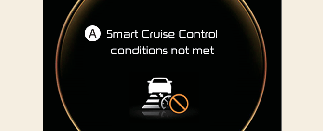
A: Smart Cruise Control conditions not met
If the Driving Assist button, (+) switch, (-) switch or () switch is operated when Smart Cruise Control operating conditions are not satisfied, the warning message will appear on
the cluster, and an audible warning will sound.
In traffic situation
A: Use switch or pedal to accelerate
In traffic, your vehicle will stop if the vehicle ahead of you stops. Also, if the vehicle ahead of you starts moving, your
vehicle will start as well.In addition, after the vehicle has stopped and a certain time has passed, the warning message will
appear on the cluster. Depress the accelerator pedal or operate the (+) switch, (-) switch or () switch to start driving.
-
When Highway Driving Assist (HDA) is active, the time allowed for automatic restart is extended.
-
If the in-cabin camera is equipped, the time allowed for automatic restart may be extended depending on whether the driver is keeping their eyes on the road.
-
If the driver is wearing sunglasses or if the system cannot detect the driver’s gaze, automatic restart may not occur.
-
If there is no vehicle ahead or the distance to the vehicle in front is too great while a guidance message is displayed, operating the (+) or (–) switch up or down, or pressing the (
)switch, will cause Smart Cruise Control to be automatically paused and the Electronic Parking Brake (EPB) to engage.
-
If you press the accelerator pedal, Smart Cruise Control will pause, but the Electronic Parking Brake (EPB) will not engage. Always pay attention to the road ahead.
-
Unexpected situations may occur on the road during the time allowed for automatic restart. Always remain attentive.
Warning road conditions ahead

A: Watch for surrounding vehicles
In the following situation, the warning message will appear on the cluster, and an audible warning will sound to warn the driver of road conditions ahead.
-
Always pay attention to vehicles or objects that may suddenly appear in front of you, and if necessary, depress the brake pedal to reduce your driving speed in order to maintain a safe distance.
-
Smart Cruise Control does not substitute for proper and safe driving. It is the responsibility of the driver to always check the speed and distance to the vehicle ahead.
-
Smart Cruise Control may not recognize unexpected and sudden situations or complex driving situations, so always pay attention to driving conditions and control your vehicle speed.
-
Keep Smart Cruise Control off when the function is not in use to avoid inadvertently setting a speed.
-
Do not open the door or leave the vehicle when Smart Cruise Control is operating, even if the vehicle is stopped.
-
Always be aware of the selected speed and headway distance.
-
Keep a safe distance according to road conditions and vehicle speed. If the headway distance is too close during high-speed driving, a serious collision may result.
-
When maintaining distance with the vehicle ahead, if the front vehicle disappears, Smart Cruise Control may suddenly accelerate to the set speed. Always be aware of unexpected and sudden situations from occurring.
-
Vehicle speed may decrease on an upward slope and increase on a downward slope.
-
Always be aware of situations such as when a vehicle cuts in suddenly.
-
If the vehicle is heavily loaded or driving on an incline, it may be difficult to maintain control depending on the road conditions. Exercise caution and use the brake pedal to manually control the speed if necessary.
-
When towing a trailer or something similar, the vehicle may experience frequent shifting and high RPM while driving, and the performance of Smart Cruise Control may be compromised. Always drive with caution.
-
Turn off Smart Cruise Control when your vehicle is being towed.
-
Smart Cruise Control may not operate properly if interfered by strong electromagnetic waves.
-
Smart Cruise Control may not detect an obstacle in front and lead to a collision. Always look ahead cautiously to prevent unexpected and sudden situations from occurring.
-
Vehicles moving in front of you with frequent lane changes may cause a delay in Smart Cruise Control reaction or may cause Smart Cruise Control to react to a vehicle actually in an adjacent lane. Always drive cautiously to prevent unexpected and sudden situations from occurring.
-
Always be aware of the surroundings and drive safely, even though a warning message does not appear or an audible warning does not sound.
-
If any other function's warning message is displayed or warning sound is generated, Smart Cruise Control warning message may not be displayed and warning sound may not be generated.
-
You may not hear the warning sound of Forward Collision-Avoidance Assist if the surrounding is noisy.
-
The vehicle manufacturer is not responsible for any traffic violation or accidents caused by the driver.
-
Always set the vehicle speed under the speed limit in your country.
-
Smart Cruise Control may not operate for a few seconds after the vehicle is restarted or the front view camera or front radar is initialized.
-
You may hear a sound when the brake is controlled by Smart Cruise Control.