
Using your call history
-
From the Phone screen, turn the [TUNE] knob on the control panel to select Call history, and then press the knob.
-
Turn the [TUNE] knob to select the desired entry, and then press the knob to make a phone call.
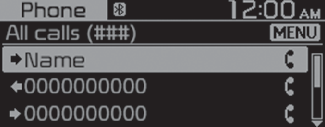
Press the [MENU/CLOCK] button on the control panel to access the following menu options:
-
Download: Download your call history.
-
All calls: View all call records.
-
Dialled calls: View only dialled calls.
-
Received calls: View only received calls.
-
Missed calls: View only missed calls.

-
Some mobile phones may not support the download function.
-
The call history is accessed only after downloading the call history when the mobile phone is connected to the system.
-
Calls from restricted IDs are not saved on the call history list.
-
Up to 50 call records will be downloaded per individual list.
-
Call duration and time information will not be displayed on the system screen.
-
Permission is required to download your call history from the mobile phone. When you attempt to download data, you may need to permit the download on the mobile phone. If the download fails, check the mobile phone screen for any notification or the mobile phone’s permission setting.
-
When you download your call history, any old data will be deleted.