
360° camera monitoring system operation
Parking/View button
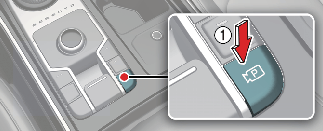
Press the Parking/View button (1) to turn on Rear View Monitor.
Press the button again to turn off the function.
Front-view
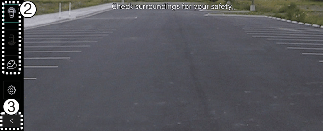
The front-view function displays the vehicle's front situation on the navigation system according to the driver's settings, assisting in safe driving.
Parking
While parking, the front-view of the 360° camera monitoring system is activated under the following conditions:
-
P (Park) or N (Neutral) or D (Drive) position with a speed slower than 10 km/h (6 mph), Pressing the Parking/View button (1).
-
Shifting from R (Reverse) to N (Neutral) or D (Drive), drive slower than 10km/h (6 mph).
-
Forward Parking Distance Warning warns the driver when the vehicle is in D (Drive)
*(If Setup → Driver Assistance → Parking Safety → Surround View Monitor Auto On on the infotainment system selected)
Pressing the view switching button (2) on the 360° camera monitoring system to select the Top View, Front-view, Side-view, or Wide View.
While parking, the front-view of the 360° camera monitoring system will be turned off under the following conditions:
-
Shifting to P (Park) or R (Reverse)
-
Pressing the Parking/View button (1)
-
Pressing the back button (3) on the 360° camera monitoring system screen
-
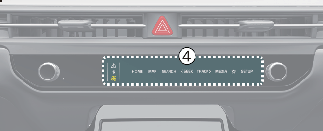
Pressing the infotainment system power button (4)
-
Driving faster than 10 km/h (6 mph)

When the front-view is activated, the last used view is displayed.
Rear-view
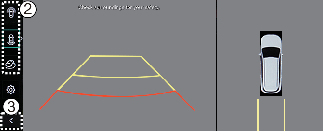
The rear-view function of the 360° camera monitoring system displays the vehicle's rear situation on the navigation system according to the driver's settings, assisting in safe parking.
Parking
While parking, the rear-view of the 360° camera monitoring system is activated in the following cases:
-
P (Parking) or N (Neutral) or D (Drive) position with a vehicle speed slower than 10 km/h (6 mph), Pressing the Parking/View button (1) and then pressing the view switching button (2) to select the rear-view
-
Shifting to R (Reverse)
Pressing the view switching button (2) on the 360° camera monitoring system to select the rear-view, rear top view, rear side-view, or rear wide view.
While parking, the rear-view function of the 360° camera monitoring system is turned off under the following conditions when the vehicle is in P (Park) or N (Neutral) or D (Drive) mode:
-
Shifting from N (Neutral) or D (Drive) to P (Parking)
-
Pressing the Parking/View button (1)
-
Pressing the back button (3) on the 360° camera monitoring system screen
-
Pressing the infotainment system power button (4)
-
Driving faster than 10 km/h (6 mph)
When the vehicle is in R (Reverse), the rear-view function of the 360° camera monitoring system will turn off under the following conditions:
-
Shifting to P (Park)
-
The rear-view will always be displayed in R (Reverse).
-
In R (Reverse) position, the video will not be turned off by pressing the infotainment system power button (4).
3D view function
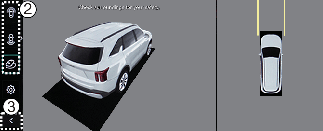
3D view function shows the vehicle in various angles. Press the 3D view icon on the 360° camera monitoring system screen to choose the angle. Press the 3D view icon again to reset the angle.
The 3D view of the 360° camera monitoring system is activated under the following conditions:
-
P (Park) or N (Neutral) or D (Drive) position with a vehicle speed slower than 10 km/h (6 mph), or when selecting the 3D view button (2) while the 360° camera monitoring system is activated in R (Reverse) mode.
The 3D view function of the 360° camera monitoring system while parking will be turned off under the following conditions:
-
Shifting from N (Neutral) or D (Drive) to P (Park)
-
Pressing the Parking/View button (1)
-
Pressing the back button (3) on the 360° camera monitoring system screen
-
Pressing the infotainment system power button (4)
-
Driving faster than 10 km/h (6 mph)
When the vehicle is in R (Reverse), the 3D view function of the 360° camera monitoring system will turn off under the following conditions:
-
Shifting to P (Park)
-
The 3D view does not display parking guidelines.
-
The top view screen, which is displayed with a Front/Rear-view or 3D view, converts the original images entered from the four wide-angle cameras to provide a 360-degree image around the vehicle that is viewed down.
-
Top view is not displayed with front/rear wide view.
-
Zoom in or out on the top view by pinching the top view area.