
Lane Keeping Assist operation
Turning Lane Keeping Assist On/Off
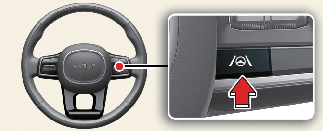
With the vehicle on, press and hold the Lane Driving Assist ( ) button located on the steering wheel to turn on and off Lane Keeping Assist.
The gray or green indicator ( ) on the cluster will light up if you turn on Lane Keeping Assist.

-
If Lane Keeping Assist is standby, the gray indicator (
) will appear on the cluster.
-
if Lane Keeping Assist is ready to operate, the green indicator (
) will appear on the cluster.
Warning and control
The Lane Keeping Assist function is warned and controlled in the following way.
-
Lane Departure Warning
-
Lane Keeping Assist


Lane Departure Warning
Lane departure warning is issued through a green indicator light on the cluster, a blinking indicator in the direction you departed from, a warning sound, and the steering wheel will vibrate.
Lane Departure Warning will be activated in the following conditions.
-
Your driving speed: Approximately 60~200 km/h (40~120 mph)
Lane Keeping Assist
The green () indicator light will blink on the cluster, and the steering wheel makes adjustments to keep vehicle inside the lane.
Lane Keeping Assist will be activated in the following conditions.
-
Your driving speed: Approximately 60~200 km/h (40~120 mph )
Hands-off warning

A: Keep hands on steering wheel
If the driver takes their hands off the steering wheel for several seconds, a warning message will appear on the cluster, and an audible warning will sound in stages.

-
The steering wheel may not be assisted if the steering wheel is held very tight or the steering wheel is steered over a certain degree.
-
Lane Keeping Assist does not operate at all times. It is the responsibility of the driver to safely steer the vehicle and to maintain the vehicle in its lane.
-
The hands-off warning message may appear late depending on road conditions. Always have your hands on the steering wheel while driving.
-
If the steering wheel is held very lightly, the hands-off warning message may appear because Lane Keeping Assist may not recognize that the driver has their hands on the steering wheel.
-
If you attach objects to the steering wheel, the hands-off warning may not work properly.
-
Even though the steering is assisted by Lane Keeping Assist, the driver may control the steering wheel.
-
The steering wheel may feel heavier or lighter when the steering wheel is assisted by Lane Keeping Assist than when it is not.
-
If you select Highway Lane Change Assist, the green lane will appear on the cluster. (if equipped)


-
The images and colors in the instrument cluster may differ depending on the cluster type or theme selected from the settings menu.
-
For more details on the instrument cluster, refer to More Details.