

Map lamp
-
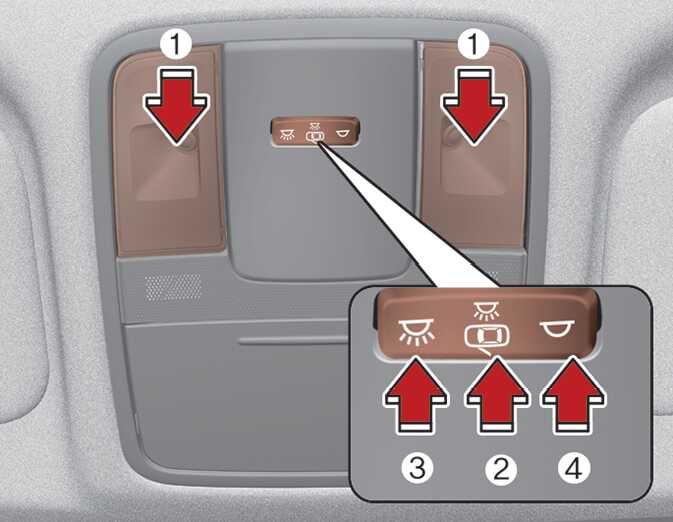
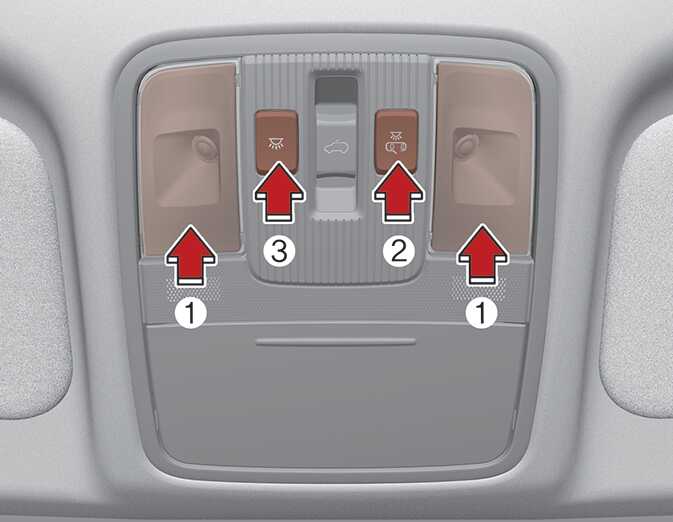
Press the lens (1) to turn ON the map lamp.
To turn the map lamp OFF press the lens (1) again.
-
 (2): DOOR mode
-
The map lamp and room lamp come on when a door is opened. The lamps go out after approximately 30 seconds.
-
The map lamp and room lamp come on for approximately 30 seconds when doors are unlocked with a smart key as long as the doors are not opened.
-
The map lamp and room lamp will stay on for approximately 10 minutes if a door is opened with the ignition switch or the ENGINE START/STOP Button in the ACC or OFF position.
-
The map lamp and room lamp will stay on continuously if the door is opened with the ignition switch or the ENGINE START/STOP Button in the ON position.
-
The map lamp and room lamp will go out immediately if the ignition switch or the ENGINE START/STOP Button is changed to the ON position or all doors are locked.
-
To turn off the DOOR mode, press the DOOR button (2) once again (not pressed).
-
-
 (3): Press this switch to turn the front map lamps on.
-
 (4): Press this switch to turn the front map lamps off.
The DOOR mode and ROOM mode can not be selected at a time.