
LCD display messages
Ready to drive

This message is displayed when the vehicle is ready to be driven.
Check brake system

This message is displayed when brake performance is low or the regenerative brakes do not work properly due to a failure in the brake system.
If this occurs, braking distance may increase.
Stop vehicle and check brake system

This message is displayed when a failure occurs in the brake system.
Park the vehicle in a safe location and have your vehicle towed to the nearest authorized Kia dealer.
Check Hybrid system

This message is displayed when there is a problem with the hybrid control system. Refrain from driving when the warning message is displayed.
Have the vehicle inspected by an authorized Kia dealer.
Stop safely and check Hybrid system

This message is displayed when there is a problem with the hybrid control system. The (READY) indicator will blink and a warning chime will sound until the problem resolves. Do not drive when the warning message is displayed.
Have the vehicle inspected by an authorized Kia dealer.
Check Hybrid system. Do not start engine

This message is displayed when the hybrid battery power (SOC) level is low. A warning chime will sound until the problem resolves. Do not drive when the warning message is displayed.
Have the vehicle inspected by an authorized Kia dealer.
Stop safely and check power supply

This message is displayed when a failure occurs in the power supply system.
Park the vehicle in a safe location and have your vehicle towed to the nearest authorized Kia dealer.
Check Virtual Engine Sound System

This message is displayed when there is a problem with the VESS.
Have the vehicle inspected by an authorized Kia dealer.
Refill coolant

This message is displayed when the inverter coolant is nearly empty.
Refill the inverter coolant.
Park with engine On to charge battery

This message is displayed when the hybrid battery power (SOC) level is low.
Park the vehicle in a safe location and wait for the hybrid battery to charge.
Start engine to avoid battery discharge
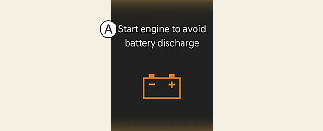
This message is displayed to inform the driver the 12V battery may be discharged if the ENGINE START/STOP button is in ON position (without the READY indicator ON).
Set the vehicle to the ready (READY) mode to prevent the 12V battery from being discharged.
Coasting guide (if equipped)
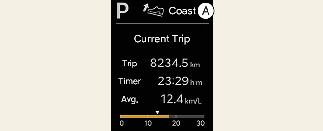
A chime will sound and the coasting guide indicator will be displayed to inform you when to take your foot off the accelerator by anticipating a deceleration event* based on the analysis of your driving routes and road conditions stored in the navigation system. It encourages you to take your foot off the pedal and allow coasting down the road with EV motor only. This helps prevent unnecessary fuel consumption and increase fuel efficiency.
* Example of a deceleration event is descending a long hill, slowing down approaching a toll booth or approaching reduced speed zones.
-
User settings
Press the ENGINE START/STOP button and put the shift dial in P (Park). In the User Settings Mode, select Driver assistance, Coasting Guide and On to turn on the system. Cancel the selection of coasting guide to turn off the system. For the explanation of the system, press and hold the [OK] button.
-
Operation conditions
To activate the system, follow these procedures:
Enter your destination information on the navigation and select the driving route. Select the ECO mode in the Integrated Driving Control System. Then satisfy the following:
-
The driving speed should be between 19 mph (30 km/h) and 99 mph (160 km/h).
-
* The operating speed may vary due to the difference between the instrument cluster and the navigation system as affected by tire inflation level.
CD mode (Plug-in hybrid vehicle)

A: Electric Mode
The high-voltage (hybrid) battery is used to drive the vehicle.
AUTO (Automatic) mode (Plug-in hybrid vehicle)

A: Automatic Mode
The drive mode will be automatically selected from either Electric (CD) mode or Hybrid (CS) mode by the system according to the driving condition.
CS mode (Plug-in hybrid vehicle)

A: Hybrid Mode
The high-voltage (hybrid) battery and gasoline engine is used to drive the vehicle.
Remaining charge time (Plug-in hybrid vehicle)
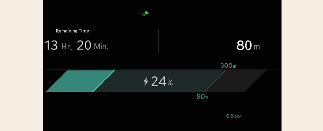
The message is displayed to notify you of the remaining time to fully charge the battery.
Charging stopped. Check the AC charger (Plug-in hybrid vehicle)
This message is displayed when the charging failed by external charger error.
The purpose of this message is to let you know an error has occurred in the charger itself, not in the vehicle.
Charging stopped. Check the cable connection (Plug-in hybrid vehicle)
This message is displayed when charging is stopped because the charging connector is not correctly connected to the charging inlet. Separate the charging connector, re-connect it and check whether there is any problem (external damage, foreign substances, etc.) with the charging connector and charging inlet. If the same problem occurs when charging with a replaced charging cable or genuine Kia portable charger, have the vehicle inspected by an authorized Kia dealer.
Low/High System Temp. Maintaining Hybrid mode (Plug-in hybrid vehicle)
This message is displayed when the temperature of the high-voltage (hybrid) battery is too low or too high to protect the battery and the hybrid system.
Low/High System Temp. Switching to Hybrid mode (Plug-in hybrid vehicle)
This message is displayed when the temperature of the high-voltage (hybrid) battery is too low or high. This warning message is to protect the battery and the hybrid system.
Switching to Hybrid mode to allow heating (Plug-in hybrid vehicle)
-
When the outdoor temperature is lower than 5 °F (-15 °C) and the coolant temperature is lower than 158 °F (70 °C), you can turn the climate control On for heating. The above message will be displayed in the instrument cluster. The vehicle will automatically switch to HEV mode and EV mode will not be activated (even with the EV/HEV button pressed)
-
When the outdoor temperature is higher than 14 °F (-10 °C), the coolant temperature is higher than 176 °F (80 °C) or you turn the climate control Off, the vehicle will automatically return to EV mode.
Wait until fuel door unlocks (Plug-in hybrid vehicle)
The message is displayed when you attempt to unlock the fuel filler door with the fuel tank pressurized. Wait until the fuel tank is depressurized.

-
It may take up to 20 seconds to unlock the fuel filler door.
-
If the fuel filler door does not open because ice has formed around it, tap lightly or push on the door to dislodge the ice and release the door.
-
Do not pry on the door. If necessary, spray around the door with an approved deicer fluid (do not use radiator anti-freeze) or move the vehicle to a warm place and allow the ice to melt.
Fuel door unlocked (Plug-in hybrid vehicle)
This message is displayed when the fuel filler door is unlocked and also means “Ready to refuel”.
Press the rear center edge of fuel filler door to open.
Check fuel door (Plug-in hybrid vehicle)
This message is displayed when the fuel filler door is open while driving or an abnormality has occurred.
Charging door open (Plug-in hybrid vehicle)
This message indicates that the charging door is open while in driving ready state.
Inspect and close the door.
(Driving with the charging door open may result in moisture inflow or damage.)
Unplug vehicle to start (Plug-in hybrid vehicle)
The message is displayed when you start the engine without unplugging the charging cable. Unplug the charging cable and start the vehicle.
Maintaining Hybrid mode to continue heating (Plug-in hybrid vehicle)
The message is displayed when heating is in on and the HEV mode is maintained to meet the heating operating conditions when attempting to switch to EV mode by pressing the EV/HEV button.
EV/HEV modes (Plug-in hybrid vehicle)
A corresponding message is displayed when a mode is selected by pressing the EV/HEV button.
PHEV infotainment system (Plug-in hybrid vehicle)
Press [PHEV] on the [Home screen].
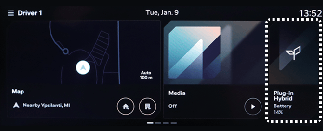
The Plug-in Hybrid menu consists of five sections: [EV range], [Energy information], [Charge management], [ECO driving], [Energy flow].
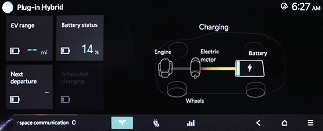
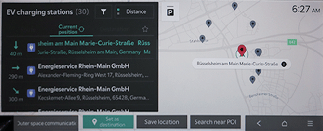
For more information, refer to the infotainment manual supplied with your vehicle.