
Utility information view
Low pressure warning display
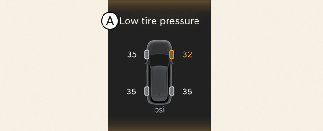
A: Low tire pressure
This warning message is displayed if the tire pressure is low. The corresponding tire on the vehicle will appear.
* For more details, refer to More Details.
Fuel economy
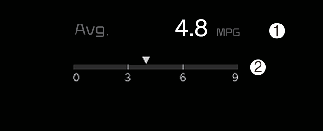
This information is always displayed at the bottom center of the Full LCD cluster.
-
Average energy economy
-
Instant energy economy
Average Fuel Economy (1)
-
The average fuel economy is calculated by the total driving distance and fuel consumption since the last average fuel economy resets.
-
Fuel economy range: 0 ~ 99.9 mpg or km/L, L/100 km
-

The average fuel economy is not displayed for more accurate calculation if the vehicle does not drive more than 10 seconds or 0.03 mi (50 m) since the ENGINE START/STOP button is turned to ON.
Instant Fuel Economy (2)
-
This mode displays the instant fuel economy during the last few seconds when the vehicle speed is more than 6.2 mph (10 km/h).
-
Fuel economy range:
0.0~30 km/L, L/100 km or 0.0~50.0 mpg
-
Drive info display
This display shows the trip distance (1), the average fuel efficiency (2), and the total driving time (3) information once per one ignition cycle.
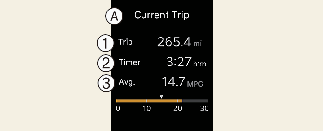
A: Current Trip
-
Trip
-
Timer
-
Avg.
-
Fuel efficiency is calculated after the vehicle has run for more than 0.19 miles (300 m).
-
The information will automatically reset when the driver's door is opened after the vehicle is turned off, or approximately 3 minutes have passed after the vehicle is turned off.
-
If you press "OK" button for more than approximately 1 second after the Driving Information is displayed, the information will be reset.
-
If the engine is running, even when the vehicle is not in motion, the information will be accumulated.
The vehicle must be driven for a minimum of 0.19 miles (300 m) since the last ignition cycle before the average accumulated driving information is recalculated.
Information since refueling
This display shows the trip distance, the average fuel efficiency, and the instant fuel efficiency (or the total driving time) since refueling.
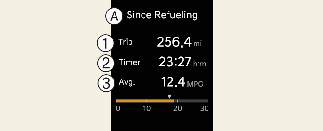
A: Sine Refueling
-
Trip
-
Timer
-
Avg.
-
Information since refueling is calculated after the vehicle has run for more than approximately 0.19 miles (300 m).
-
If you press "OK" button for more than 1 second after the information since refueling is displayed, the information will be reset.
-
When driving after refueling, the information will be automatically reset.
-
If the engine is running, even when the vehicle is not in motion, the information will be accumulated.
The vehicle must be driven for a minimum of 0.19 miles (300 m) since the last ignition cycle before the average accumulated driving information is recalculated.
Accumulated driving information mode
This display shows the accumulated trip distance, the average fuel efficiency, and the total driving time.
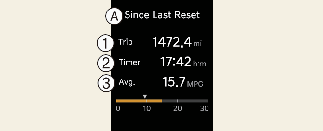
A: Since Last Reset
-
Trip
-
Timer
-
Avg.
-
Accumulated information is calculated after the vehicle has run for more than 0.19 miles (300 m).
-
If you press "OK" button for more than 1 second after the Cumulative Information is displayed, the information will be reset.
-
If the engine is running, even when the vehicle is not in motion, the information will be accumulated.
Energy flow

The hybrid system informs the driver about its energy flow in various operating modes. While driving, the current energy flow is specified in 11 modes.
* For more details, refer to More Details.
Range (Plug-in hybrid vehicle)
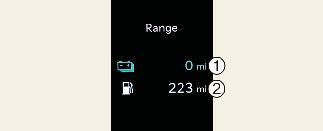
The range is the estimated distance the vehicle can be driven with the remaining high-voltage (hybrid) battery (1, Electric) and fuel in the fuel tank (2, Gasoline).
-
If the estimated distance is below 1 mile (1 km), the trip computer will display “---” as distance to empty.
-
Distance range: 1 ~ 510 miles or 1 ~ 510 km.
-
-
If the vehicle is not on level ground or the battery power has been interrupted, the range function may not operate correctly.
-
The range may differ from the actual driving distance as it is an estimate of the available driving distance.
-
The trip computer may not register additional fuel if less than 1.6 gallons (6 liters) of fuel are added to the vehicle.
-
The range may vary significantly based on driving conditions, driving habits, and condition of the vehicle.
Master warning mode

This mode informs you of the following situations:
-
Driver assistance system malfunction, limitation or radar/camera blockage (if equipped)
-
LED headlamp malfunction
-
Lamp malfunction
-
TPMS (Tire Pressure Monitoring System) failure, low tire pressure, etc.
The Master Warning icon ( ) will appear. If the situation re solves, the master warning light will turn off and the Master Warning icon will disappear.