
Coasting guide
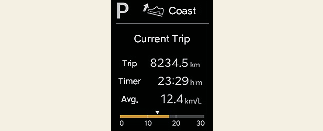
A chime will sound and the coasting guide indicator will be displayed to inform the driver when to take the foot off the accelerator by anticipating a decelerating event* based on the analysis of driving routes and road conditions stored in the navigation system. It encourages the driver to remove the foot from the pedal and allow coasting down the road with EV motor only. This helps to prevent unnecessary fuel consumption and increases fuel efficiency.
* Example of a deceleration event is going down an extended hill, slowing down approaching a toll booth, and approaching reduced speed zones.
Setting coasting guide
-
With the vehicle on, shift to P (Park) and select Setup → Vehicle → Driver Assistance → Coasting Guide on the infotainment system.
-
Cancel the selection of coasting guide to turn off the system. For the explanation of the system, press and hold OK button.
Operating condition(s)
To activate coasting guide, take the following procedures.
-
Enter your destination information on the navigation and select the driving route.
-
Select ECO mode from the drive mode integrated control system. Then, satisfy the following:
-
The driving speed should be between 19 mph (30 km/h) and 99 mph (160 km/h).
-

The operating speed may vary due to difference between instrument cluster and navigation effected by tire inflation level.