
USB Charger (if equipped)
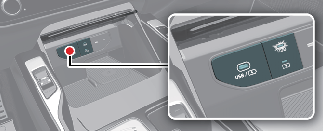

Plug the cable into the USB port, and charging will begin.
The USB car charger is available with either the ACC or the ignition on. We recommend you connect the USB port and digital devices with the engine running. See the display screen of the device to check its charging process completion. Your smartphone or tablet could heat up while charging. This doesn't impact life or functions of the device. For safety, charging can be stopped if the battery gets heated up to a certain point of temperature that the devices can be negatively affected. Charging some digital devices is not available or requires special dedicated adapters if their charging methods don't fit the USB car charger. Quick Charge 3.0 is available on a smartphone or tablet equipped with fast charging capabilities. The applicable is as follows: (https://www.qualcomm.com/documents/quick-charge-device-list)
The smartphone or tablet without fast charging is charged at a regular speed.

-
Power Delivery 3.0 is available on a smartphone or the tablets equipped with fast charging capabilities. It is applicable to digital devices with USB C-type. Charging speed is determined according to the charging specification of the connected digital device.
-
Rated output: 9.0V/Max 3.0A

-
Use the USB car charger with the ignition on. The battery can discharg.
-
Use the official USB cable of the manufacturer of the digital device to be charged.
-
Make sure that any foreign object or liquid, do not contact the USB car charger. Water or a foreign object can damage the USB charger.
-
Do not connect an electrical device that generates excessive electromagnetic noise to the USB car port. Vehicle electronic devices can be interrupted while audio or AV is on.
-
If the charger is connected incorrectly, it can cause serious damage on the devices. Please note that damages due to incorrect usage are not covered by your warranty.