

Forward Collision-Avoidance Assist Settings
Forward Safety
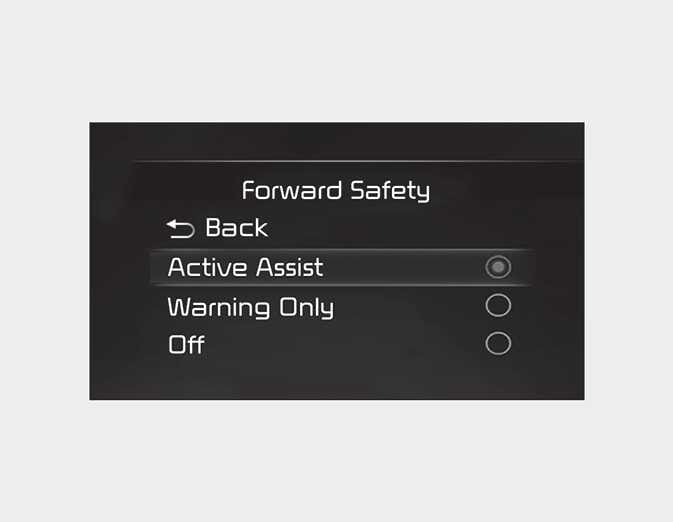
With the ENGINE START/STOP button in the ON position, select or deselect 'Driver Assistance → Forward Safety' from the Settings menu to set whether or not to use each function.
-
If 'Active Assist' is selected, the function will warn the driver with a warning message, an audible warning and steering wheel vibration depending on the collision risk levels. Braking assist will be applied depending on the collision risk.
-
If 'Warning Only' is selected, the function will warn the driver with a warning message, an audible warning and steering wheel vibration depending on the collision risk levels. Braking will not be assisted.
-
If 'Off' is selected, the function will be turned off. The(
 )warning light will appear on the cluster.
The driver can monitor Forward Collision-Avoidance Assist ON/OFF status from the Settings menu. If the (
 )warning light remains ON when the function is ON, have the function be inspected by an authorized Kia dealer.
When the engine is restarted, Forward Collision-Avoidance Assist will always turn on. However, if 'Off' is selected after the engine is restarted, the driver should always be aware of the surroundings and drive safely.
-
If 'Warning Only' is selected, braking is not assisted.
-
Steering wheel vibration can be turned on or off. Select or deselect 'Driver Assistance → Haptic Warning' from the Settings menu.
Forward Collision-Avoidance Assist will turn off when ESC is turned off by pressing and holding the ESC OFF button. The(
 )warning light will appear on the cluster.