

2. Remotely moving forward and backward
-
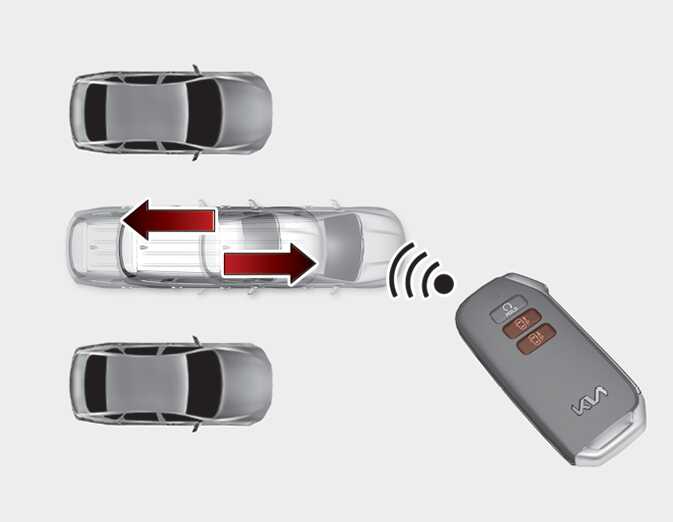
Press and hold one of the Forward (
 ) or Backward (
 ) button on the smart key. Remote Smart Parking Assist will automatically control the steering wheel, vehicle speed and gearshift. The vehicle will move in the direction of the button pressed.
-
While Remote Operation function is operating, if the you do not hold down the Forward (
 ) or Backward (
 ) button, the vehicle will stop and function control will pause. The function will start operating again when the button is pressed and held again.
-
When the vehicle reaches the target location, the function will turn off.
-
When the driver gets on the vehicle with the smart key, a message will appear informing the driver Remote Operation function is complete on the infotainment system screen.
In addition, when the Remote Start (
 ) button is pressed on the smart key, a message will appear informing the driver Remote Operation function is complete and the engine will turn off.
-
Remote Operation function will operate only when the smart key is within 4 m (13 ft.) from the vehicle. If there is no vehicle movement even when the Forward or Backward button is pressed on the smart key, check the distance to the vehicle and press the button again.
-
The detecting range of the smart key may vary depending on the surroundings that are affected by radio waves such as transmission tower, broadcast station, etc.
-
When remotely moving forward using method (1), it is recognized as an exit situation, and the vehicle moves 4 m (13 ft.) to check for pedestrians, animals or objects around the vehicle. After confirmation, the steering wheel is controlled according to the condition ahead.
-
When remotely moving forward using method (2), it is recognized as a parking situation, and will immediately control the steering wheel according to the condition ahead to assist with entering the parking space and aligning the vehicle. However, performance may reduce depending on the pedestrians, animals, shape of objects, location, etc. around the vehicle.
-
For moving remotely backward, both method (1) and (2) aligns the steering wheel first, and then will only move the vehicle straight.
-
When remotely moving forward or backward is completed, the vehicle will automatically shift to P (Park) and engage EPB (Electronic Parking Brake).
-
When using Remote Operation function, make sure that all passengers have gotten out of the vehicle.
-
Before leaving the vehicle, close windows and sunroofs, and make sure the engine is off before locking the doors.
-
If the vehicle’s battery is discharged or Remote Smart Parking Assist malfunctions when parked in a narrow parking space, Remote Operation function will not operate. Always park your vehicle in a space wide enough for you to get in or out of your vehicle.
-
Please note that depending on the parking space, you may not be able to exit from the space you have entered by using Remote Operation function.
-
After parking, the surrounding may change due to the movement of surrounding vehicles. If this occurs, Remote Operation function may not operate.
How to turn off Remote Operation function while operating
-
Press the Remote Start (
 ) button on the smart key.
-
Press the Parking/View (
 ) button.
-
Press the Parking Safety (
 ) button or select 'Cancel' on the infotainment system screen.
-
Press the Remote Start (
 ) button on the smart key. Remote Operation function will turn off. At this time, the engine will turn off.
-
Get on the vehicle with the smart key. Remote Operation function will turn off. At this time, the engine will remain on.
The function will pause in the following conditions when:
-
There is a pedestrian, animal or object in the direction the vehicle is moving
-
The door or liftgate is open
-
The Forward (
 ) or Backward (
 ) button is not continuously pressed
-
Simultaneously pressing multiple buttons on a smart key
-
The smart key is not operated within 4 m (13 ft.) from the vehicle
-
Button of another smart key is pressed in addition to the operating smart key
-
Blind-Spot Collision-Avoidance Assist or Rear-Cross Traffic Collision Assist operates while the vehicle is being controlled in the reverse direction
-
The vehicle moves 7 m (22 ft.) while the smart key is pressed with Remote Operation function (maximum travel distance per button press)
When Remote Moving Forward/Backward function is paused, the vehicle will stop. If the condition that made the function to pause disappears, the function may operate again.
The function will cancel in the following conditions when:
-
The steering wheel is steered
-
The gear is shifted while the vehicle is moving
-
Operating EPB while the vehicle is moving
-
The engine hood is open
-
Vehicle speed is above 3 mph(5 km/h)
-
Rapid acceleration occurs
-
Vehicle skid occurs
-
The wheel is stuck by an obstacle and cannot move
-
There are pedestrians, animals or objects at the front and rear of the vehicle at the same time
-
Approximately 3 minutes and 50 seconds have past after Remote Moving Forward/Backward function has started to operate
-
The slope of the road exceeds the operational range
-
The steering wheel, gearshift, braking, and drive controls are not working normally
-
The function is paused for more than 1 minute
-
The total travel distance of the vehicle has exceeded 14 m (45 ft.) after Remote Operation function operation
-
There is a problem with the smart key or the smart key battery is low
-
ABS, TCS or ESC operates due to slippery road conditions
-
The brake pedal or accelerator pedal is depressed when all the doors are closed
-
The smart key is outside the vehicle when the brake pedal is depressed while the driver's door is open.
-
The alarm of the Theft Alarm System sounds
When Remote Operation function is canceled, the vehicle will automatically stop, shift the gear to P (Park) and engage EPB (Electronic Parking Brake).
Check whether the doors are locked when Remote Operation function is canceled.