
Driver Attention Warning settings
Driver Attention Warning

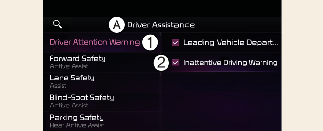
A: Driver Assistance
-
Driver Attention Warning
-
Inattentive Driving Warning
With the vehicle on, select or deselect Settings → Driver Assistance → Driver Attention Warning from the User Settings menu or select or deselect Settings → Vehicle → Driver Assistance → Driver Attention Warning from the infotainment system to set whether or not to use each function.
-
Inattentive Driving Warning: Driver Attention Warning will inform the driver the driver's attention level and will recommend taking a break when the level falls below a certain level.
Leading Vehicle Departure Alert

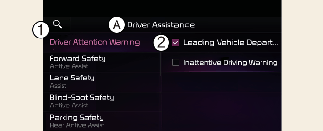
A: Driver Assistance
-
Driver Attention Warning
-
Leading Vehicle Departure Alert
Leading Vehicle Departure Alert: The function will inform the driver when the front vehicle departs from a stop.
Warning Timing

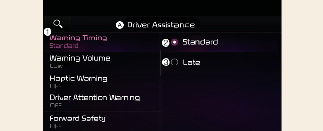
A: Driver Assistance
-
Warning Timing
-
Standard
-
Late
With the vehicle on, select Settings → Driver Assistance → Warning Timing from the User Settings menu or select Settings → Vehicle → Driver Assistance → Warning Timing from the infotainment system to change the initial warning activation time for Driver Attention Warning.
-
Standard: Use in a normal driving environment. If Driver Attention Warning operates too sensitive, set the warning timing to Late.
-
Late: The warning timing will be late

-
If you change the Warning Timing, the warning time of other Driver Assistance systems may change.
-
If the vehicle is restarted, Driver Warning Time will maintain the last setting.