
Inside rearview mirror
Do not place objects in the rear seat or cargo area which would interfere with your vision through the rear window.

Mirror adjustment
Do not adjust the rearview mirror while the vehicle is moving. This could result in loss of control.

Do not modify the inside mirror in any manner, including installing a wide mirror. Doing so could result in injury during an accident or deployment of the air bag.

Cleaning mirror
When cleaning the mirror, use a paper towel or similar material dampened with glass cleaner. Do not spray glass cleaner directly on the mirror. It may cause the liquid cleaner to enter the mirror housing.
Day/night rearview mirror (if equipped)

* (1): Day, (2): Night
Pull the day/night lever toward you (2) to reduce the glare from the headlights of the vehicles behind you when driving at night.
Remember that you lose some rearview clarity in the night position.
Electric Chromic Mirror (ECM) (if equipped)
The sensor (3) mounted in the mirror senses the light level around the vehicle, and automatically controls the headlight glare from the vehicles behind you.
When the engine is running, the glare is automatically controlled by the sensor mounted in the rearview mirror. Whenever the shift lever is shifted into reverse (R), the mirror will automatically go to the brightest setting in order to improve the drivers view behind the vehicle.
Cleaning mirror
When cleaning the mirror, use a paper towel or similar material dampened with glass cleaner. Do not spray glass cleaner directly on the mirror. It may cause the liquid cleaner to enter the mirror housing.
Operating the electric rearview mirror

-
Press the ON/OFF button (1) to turn the automatic dimming function off. The mirror indicator light will turn off.
-
Press the ON/OFF button (1) to turn the automatic dimming function on. The mirror indicator light (2) will illuminate.
Electric chromic mirror with HomeLink system (if equipped)
Operating the electric rearview mirror

-
Press the I button (1) to turn the automatic- dimming function on. The mirror indicator light will illuminate.
-
Press the O button (2) to turn the automatic- dimming function off. The mirror indicator light will turn off.
HomeLink® Wireless Control system

-
Homelink buttons
-
Indicator light
-
Glare detection sensor
Your new mirror comes with an integrated HomeLink Universal Transceiver, which allows you to program the mirror to activate your garage door(s), estate gate, home lighting, etc. The mirror actually learns the codes from your various existing transmitters.
Retain the original transmitter for future programming procedures (i.e., new vehicle purchase). It is also suggested that upon the sale of the vehicle, the programmed HomeLink buttons be erased for security purposes (follow step More Details in More Details).
Programming HomeLink
Follow these steps to train your HomeLink mirror:
-
When programming the buttons for the first time, press and hold the left and center buttons (
 ,
,  ) simultaneously until the indicator light begins to flash after approximately 20 seconds. (This procedure erases the factory-set
default codes. Do not perform this step when programming the additional HomeLink buttons.)
) simultaneously until the indicator light begins to flash after approximately 20 seconds. (This procedure erases the factory-set
default codes. Do not perform this step when programming the additional HomeLink buttons.)

-
Flashing
NOTICEFor non-rolling code garage door openers, follow steps More Details- More Details.
For rolling code garage door openers, follow steps More Details- More Details.
For Canadian Programming, please follow the Canadian Programming section. For help with determining whether your garage door opener is non-rolling code or rolling code, please refer to the garage door openers owner's manual or contact HomeLink customer service at 1- 800-355-3515.
-
-
Press and hold the button on the HomeLink system you wish to train and the button on the transmitter while the transmitter is approximately 1~3 inches (2~8 cm) away from the mirror. Do not release the buttons until step 3 has been completed.
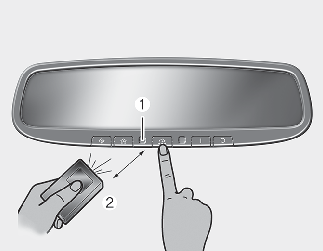
-
Flashing
-
Transmitter
-
-
The HomeLink indicator light will flash, first slowly and then rapidly. When the indicator light flashes rapidly, both buttons may be released. (The rapid flashing light indicates successful programming of the new frequency signal.)
Some gate and garage door openers may require you to replace step More Details with the "cycling" procedure noted in the "Canadian Programming" section of this document.
Programming rolling code
To train a garage door opener (or other rolling code equipped devices) with the rolling code feature, follow these instructions after completing More Details. (A second person assisting may make the following training procedures quicker & easier.)
-
Locate the "learn" or "smart" button on the device's motor head unit. Exact location and color of the button may vary by product brand. If there is difficulty locating the "learn" or "smart" button, reference the device's owner's manual or contact HomeLink at 1-800- 355-3515 or on the internet at www.homelink.com.
-
Press and release the "learn" or "smart" button on the device's motor head unit. You have 30 seconds to complete step More Details.
-
Return to the vehicle and firmly press and release the programmed HomeLink button up to three times. The rolling code equipped device should now recognize the HomeLink signal and activate when the HomeLink button is pressed. The remaining two buttons may now be programmed if they have not already been programmed. Refer to More Details.
Operating HomeLink
To operate, simply press the programmed HomeLink button.
Activation will now occur for the trained product (garage door, security system, entry door lock, estate gate, or home or office lighting). For convenience, the hand-held transmitter of the device may also be used at any time. The HomeLink Wireless Controls system (once programmed) or the original hand-held transmitter may be used to activate the device (e.g., garage door, entry door lock, etc.). In the event that there are still programming difficulties, contact HomeLink at 1-800-355-3515 or on the internet at www.homelink.com.
Erasing programmed HomeLink buttons
To erase the three programmed buttons (individual buttons cannot be erased):
-
Press and hold the left and center buttons simultaneously, until the indicator light begins to flash (approximately 20 seconds). Release both buttons. Do not hold for longer than 30 seconds.
HomeLink is now in the train (or learning) mode and can be programmed at any time.
Reprogramming a single HomeLink button
To program a device to HomeLink using a HomeLink button that has already been trained, follow these steps:
The previous device has now been erased and the new device can be activated by pushing the HomeLink button that has just been programmed. This procedure will not affect any other programmed HomeLink buttons.
Canadian Programming Garage & gate openers
During programming, your hand-held transmitter may automatically stop transmitting. Continue to press and hold the HomeLink button (note steps More Details through More Details in More Details) while you press and re-press ("cycle") your handheld transmitter every two seconds until the frequency signal has been learned. Upon successful training, the indicator light will flash slowly and then rapidly after several seconds.
Accessories
If you would like additional information on the HomeLink Wireless Control system, HomeLink compatible products, or to purchase other accessories such as the HomeLink® Lighting Package, please contact HomeLink at 1-800-355-3515 or on the internet at www.homelink.com.
FCC ID: NZLZTVHL3
IC: 4112A-ZTVHL3
This device complies with Part 15 of the FCC rules.
-
This device may not cause harmful interference, and
-
This device must accept any interference received, including interference that may cause undesired operation.
The transceiver has been tested and complies with FCC and Industry Canada rules. Changes or modifications not expressly approved by the party responsible for compliance could void the user's authority to operate the device.