
Surround View Monitor (SVM) (if equipped)
For detailed information, refer to a separately supplied manual.

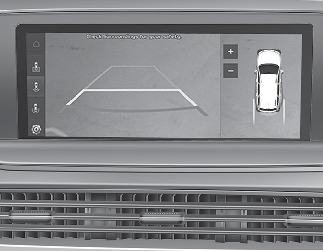
-
The function is activated when the following steps are performed.
-
The Parking/View button (1, indicator ON) is pressed.
-
The shift lever is in D (Drive), N (Neutral) or R (Reverse) and vehicle speed is under 10 mph (15 km/h).
-
-
The function is deactivated when one of the following is performed.
-
The Parking/View button (1, indicator OFF) is pressed again.
-
Vehicle speed is over 10 mph (15 km/h).
-
-
When vehicle speed is over 10 mph (15 km/h), the function will turn off.
The function will not automatically turn on again, even though vehicle speed gets below 10 mph (15 km/h).
Press the Parking/View button (1, indicator ON) again, to turn on the function.
-
When the vehicle is backing up, the function will turn ON regardless of vehicle speed or button status however, if vehicle speed is over 10 mph (15 km/h) when driving forward, Surround View Monitor will turn off.
-
A indicator on the screen appears when:
-
The liftgate is opened.
-
The driver's door is opened.
-
The passenger's door is opened.
-
The outside rearview mirror is folded.
-
-
If the function is not operating normally, the function should be checked by an authorized Kia dealer.

The function is a supplementary driving assist function. Make sure to check the vehicle's surroundings yourself for safety. Do not solely rely on what is displayed on the screen. What you see on the screen may differ from the actual vehicle's location.

If the camera lens is covered with foreign material, Surround View Monitor may not operate normally. Always keep the camera lens clean. However, do not use chemical solvents such as strong detergents containing high alkaline or volatile organic solvents (gasoline, acetone etc.). This may damage the camera lens.