
Remote key
With a remote key, you can lock or unlock the door and liftgate.
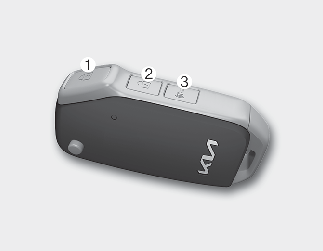
Lock (1)
All doors are locked if the lock button is pressed. If all doors are closed, the hazard warning lights will blink and the chime will sound once to indicate that all doors are locked.
Also, if the lock button is pressed once more within 4 seconds, the hazard warning lights will blink and the chime will sound once to confirm that the door is locked.
However, if any door remains open, the hazard warning lights (and/or the chime) will not operate. But if all doors are closed after the lock button is pressed, the hazard warning lights will blink once.
Unlock (2)
The driver's door is unlocked if the unlock button is pressed once. The hazard warning lights will blink twice to indicate that the driver's door is unlocked.
All doors are unlocked if the unlock button is pressed once more within 4 seconds. The hazard warning lights will blink and the chime will sound twice again to indicate that all doors are unlocked. After pressing this button, the doors will lock automatically unless you open any door within 30 seconds.
If you attempt to lock or unlock the door by pressing the door lock/unlock button in any of the following countries, the door will not be locked or unlocked.
-
When you want to lock or unlock the door in the ACC or ON state.
-
When you want to lock a door in a car with one or more doors open.
Depending on the vehicle, the driver can turn off or set the 2-press unlock setting function.

If the remote key is inoperative due to exposure to water or liquids, it will not be covered by your manufacturer's vehicle warranty.
Panic alarm (3)
The horn sounds and the hazard warning lights blink for about 30 seconds if this button is pressed for more than 0.5 seconds. To stop the horn and lights, press any button on the transmitter.
Mechanical key
If the remote key does not operate normally, you can lock or unlock the door by using the mechanical key.
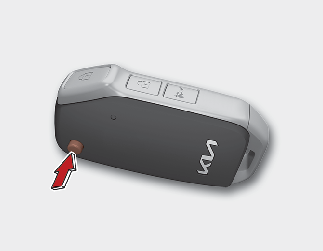
To unfold the key, press the release button then the key will unfold automatically.
To fold the key, fold the key manually while pressing the release button.

Key button operation
Do not fold the key without pressing the release button. This may damage the key.
Transmitter precautions
The transmitter will not work if any of the following occurs:
-
The ignition key is in the ignition switch.
-
You exceed the operating distance limit. (about 33 ft [10 m].)
-
The battery in the transmitter is weak.
-
Other vehicles or objects may be blocking the signal.
-
The weather is extremely cold.
-
The remote key is close to a radio transmitter such as a radio station or an airport which can interfere with normal operation of the transmitter.
When the transmitter does not work properly, open and close the door with the ignition key. If you have a problem with the remote key, contact an authorized Kia dealer.
-
If the transmitter is in close proximity to your cell phone or smart phone, the signal from the transmitter could be blocked by normal operation of your cell phone or smart phone. This is especially important when the phone is active such as making calls, receiving calls, text messaging, and/or sending/receiving emails. Avoid placing the remote key and your cell phone or smart phone in the same pants or jacket pocket and maintain adequate distance between the two devices.
Transmitter
Keep the transmitter away from water or any liquid as, it can become damaged and not function properly.
If the remote key is inoperative due to exposure to water or liquids, it will not be covered by your manufacturer's vehicle warranty.