

Mechanical key
When the battery of the smart key is discharged, or the smart key does not operate normally, you can lock or unlock the door using the mechanical key (2).
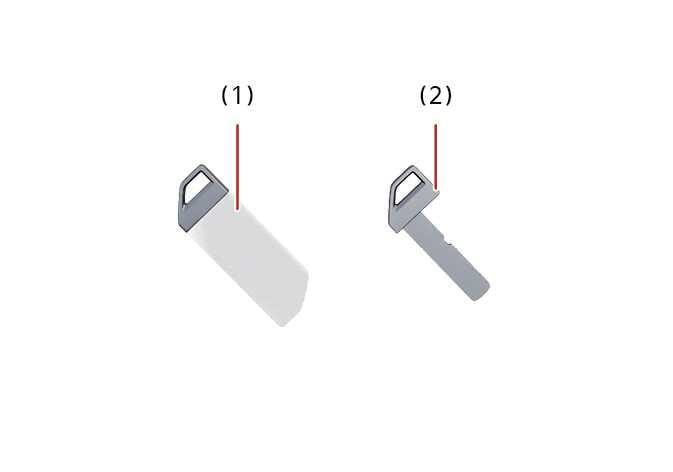 N_CT25C002 |
|
To remove the mechanical key, pull the mechanical key protective cover (1) off the smart key.
Smart key precautions
The smart key may not operate if any of the following occur:
-
The smart key is close to a radio transmitter such as a radio station, military area, police station, government offices, broadcasting stations, transmission towers, port or an airport which can interfere with normal operation of the smart key.
-
The smart key is near a mobile two way radio system or a mobile phone.
-
The smart key is close to a metal product or coins.
-
Another vehicle’s smart key is being operated close to your vehicle.
-
When you connect an external device to the multi-purpose socket or USB port and place it near the smart key, the smart key may not be recognised/work in some areas of the vehicle. In this case, try moving the smart key to another location to start the vehicle or press the start button directly with the smart key to start the vehicle.
In the following situations, the frequency band from the smart key may be mixed with a different frequency, which may cause smart key malfunction (vehicle operation, door lock function, etc.) or the working distance of smart key may change.
-
The smart key is placed near the electronic systems (woofer, mobile phone, portable wired/wireless charger, electric heating device, electronic power bank, e-cigarettes, etc.)
Losing the smart key
A maximum of 2 smart keys can be registered to a single vehicle.
If you happen to lose both smart keys, you will not be able to start the vehicle. You should immediately contact an authorised Kia dealer or service partner for assistance. Tow the vehicle if necessary to protect it from potential theft.
Smart key
Keep the remote key away from water or any liquid, as it can become damaged and not function properly.
-
To prevent magnetic damage to the smart key, do not leave it near the following electrical appliances:
-
TVs
-
Personal computers
-
Mobile phones, cordless phones, and battery chargers
-
Table lamps
-
Induction cookers
-
-
If you must leave the vehicle’s key with a parking attendant, remove the mechanical key for your own use and provide the attendant with the smart key only.
-
When bringing a smart key onto an airplane, make sure you do not press any button on the key whilst inside the cabin. If you are carrying the key in your bag or elsewhere, make sure that the buttons cannot be pressed accidentally. If you press a button, the key may emit radio waves that could interfere with aircraft operation.
-
If the smart key is inoperative due to exposure to water or other liquids, it will not be covered by your manufacturer’s vehicle warranty.