

EV button
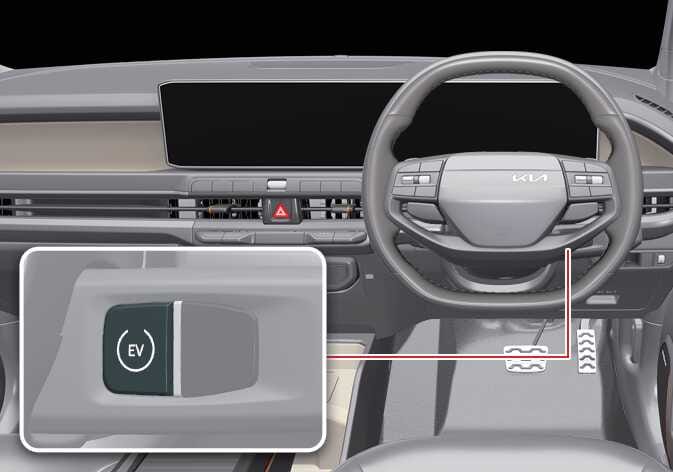 OAYIEV096009R |
OFF
-
To completely turn off from DRIVE READY or POWER ON state, stop the vehicle, shift to P (Park), and press the EV button whilst engaging the brake pedal.
In an emergency situation whilst the vehicle is in motion, you can turn the vehicle off and set it to the POWER ON position by pressing the EV button for more than 2 seconds, or 3 times repeatedly within 3 seconds. If the vehicle is still moving, restart it by pressing the EV button whilst the speed is above approximately 5 km/h (3 mph).
-
When you start the vehicle whilst shifting to R (Reverse), D (Drive), or N (Neutral), the vehicle automatically shifts to P (Park) and then turns off.
-
You can only turn the vehicle off when it is not in motion.
Anti-theft steering column lock
-
To protect you from theft, the steering wheel locks when the EV button is in the OFF position.
-
The steering wheel also locks when you open the door.
-
If the steering wheel does not lock properly when you open the driver side door, the warning chime sounds. Try locking the steering wheel again. If that does not solve the problem, have your vehicle inspected by a professional workshop. Kia recommends visiting an authorised Kia dealer or service partner.
-
Additionally, the steering wheel does not lock and the warning chime sounds if you press the EV button in the OFF position after opening the driver side door. In this situation, close the door so that the steering wheel locks and the warning chime stops.
If the steering wheel does not unlock properly, the EV button does not work. Press the EV button whilst turning the steering wheel right and left to release the tension.
-
You can only turn the vehicle on or off by pressing the EV button in POWER ON position when your vehicle is not in motion.
-
If your vehicle is in motion during an emergency, you can turn the vehicle off by pressing the EV button in the OFF position for more than 2 seconds, or 3 times repeatedly within 3 seconds.
If your vehicle is still moving, you can restart it by pressing the EV button when the vehicle speed is 5 km/h (3 mph) or above.
POWER ON
-
Press the EV button once without engaging the brake pedal.
-
Check the warning lights.
-
Within 14 minutes after the vehicle is in the POWER ON position, the infotainment system screen displays the menu shown below. To continue using the vehicle power, tap Start Utility Mode.
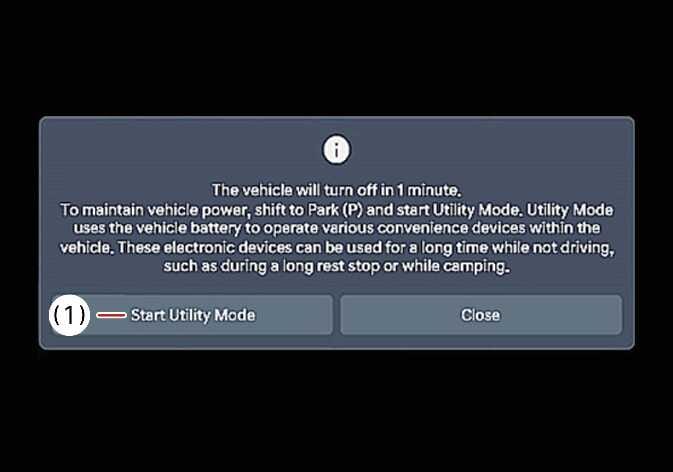 N_QVe27_C00_001_E
-
Start Utility Mode
-
-
If you maintain POWER ON for 15 minutes without converting to utility mode, the vehicle power turns off.
-
If you use the high voltage battery charging and outdoor V2L features with POWER ON, utility mode operates and the vehicle power does not turn off.
-
You can change the infotainment system through updates. For more information, refer to Over-The-Air (OTA) software update.
DRIVE READY
-
With the vehicle OFF or in the POWER ON state, press the EV button and engage the brake pedal whilst the vehicle is in P (Park).
-
Never press the EV button whilst the vehicle is in motion. Doing so could result in loss of directional control and braking function and cause an accident.
-
Before leaving the driver’s seat, always make sure to shift to P (Park), fully apply the parking brake, and turn the vehicle off. The vehicle might move suddenly and unexpectedly if you do not take these precautions.
-
Never reach for the EV button or any other controls through the steering wheel whilst the vehicle is in motion. The presence of your hand or arm in this area could cause you to lose control of the vehicle, resulting in an accident, serious bodily injury, or death.
-
Do not place any movable objects around the driver’s seat, as they might move, interfere with your driving, and lead to an accident.
If you press the EV button without engaging the brake pedal, the vehicle does not start, and the EV button changes as follows: