

Starting the vehicle
-
Always carry the smart key with you.
-
Make sure the parking brake is applied.
-
Make sure the vehicle is in P (Park).
-
Engage the brake pedal.
-
Press the EV button. If the vehicle starts, READY indicator will come on.
Do not start the vehicle with the accelerator pedal depressed. The vehicle can move and lead to an accident.
To prevent damage to the vehicle:
-
If the READY indicator turns off whilst you are in motion, do not attempt to shift to P (Park).
If traffic and road conditions permit, you may shift to N (Neutral) whilst the vehicle is still moving and press the EV button in an attempt to restart the vehicle.
-
Do not push or tow your vehicle to start the vehicle.
-
The vehicle will start by pressing the EV button, only when the smart key is in the vehicle.
-
Even when the smart key is in the vehicle, if it is far away from the driver, the vehicle may not start.
-
When the EV button is in the POWER ON or DRIVE READY state, and any door is open, the system checks for the smart key. If the smart key is not in the vehicle, the indicator (
 ) and the message will appear on the instrument cluster. When all doors are closed, the chime will also sound for about 5 seconds. Keep the smart key in the vehicle when in the POWER ON state.
Starting the vehicle with smart key
At the time that the vehicle doors are opened or when the EV button is pressed, the vehicle will check for the smart key.
If the smart key is not in your vehicle, the () indicator and the message appear on the instrument cluster. If all doors are closed, the chime sounds for 5 seconds. The indicator or chime turns off whilst your vehicle is moving. Always have the smart key with you.
The vehicle only starts when the smart key is in your vehicle. Never allow a child or any person who is unfamiliar with your vehicle to touch the EV button or related parts. Pressing the EV button whilst the smart key is in your vehicle may result in unintended vehicle operation or vehicle movement.
-
If the vehicle turns off whilst your vehicle is in motion, do not attempt to shift to P (Park). If traffic and road conditions permit, you may shift to N (Neutral) whilst your vehicle is still moving, and press the EV button to attempt to restart the vehicle.
-
Do not press the EV button for more than 10 seconds except when the stop lamp fuse is blown.
-
If you leave the vehicle in the POWER ON position for a long time, the 12V battery discharges.
-
If you enter the vehicle with the smart key or digital key (UWB) (if equipped) whilst the Target Temperature function is operating, the vehicle switches to the DRIVE READY state. To switch to the DRIVE READY state without the smart key or digital key, you must place the NFC card or digital key (if equipped) on the charging pad, then close the door or engage the brake pedal.
If you close the door or engage the brake pedal whilst the smart key or digital key (if equipped) is not inside the vehicle, the instrument cluster displays a related warning message. Be careful after switching to the DRIVE READY state, as the vehicle might move if you shift from P (Park) to another gear position.
-
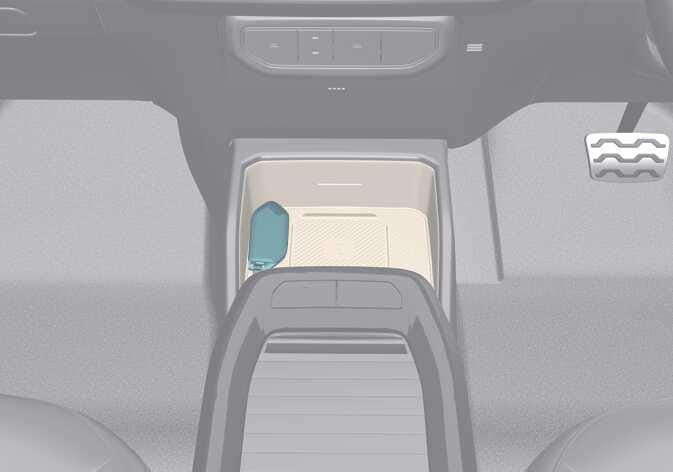 OAYIEV096008R
If the smart key battery is weak or the smart key does not work correctly, you can start the vehicle by placing the smart key on the key recognition area (
 ) located on the centre console and then pressing the EV button for about 10 seconds in OFF position.
 -
If the brake light fuse is blown, you cannot start the vehicle normally.
Replace the fuse with a new one. If this is not possible, start the vehicle by pressing the EV button in the OFF position for 10 seconds. The vehicle can start without the brake pedal engaged, but for your safety, always engage the brake pedal before starting the vehicle.