
LCD display modes
|
View |
Description |
|---|---|
|
Driving Assist view |
Displays information related to Driver assistance system |
|
Navigation view |
Displays information related to navigation system |
|
Utility information view |
Displays information related to driving, warning, etc. |

-
The Items displayed in the LCD display mode may differ depending on which functions are applicable to your vehicle your vehicle.
Driving assist view

This mode displays the state of:
-
Lane Keeping Assist
Blind-Spot Collision-Avoidance Assist
Smart Cruise Control
Lane Following Assist
Highway Driving Assist
Navigation view

This mode displays the Navigation status.
Utility information view
Current Driving Info
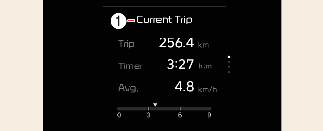
1: Current Trip
The driver's door is opened after turning off the vehicle or the vehicle is turned on after 3 minutes have passed, the Drive Info screen will reset.
Fuel economy
1: Current Trip
-
The average fuel economy is calculated by the total driving distance and fuel consumption since the last average fuel economy reset.
-
Fuel economy range: 0 – 99.9 MPG or L/100km, km/L
-
-
The average fuel economy can be reset both manually and automatically.
The average fuel economy is not displayed for more accurate calculation if the vehicle does not drive more than 10 seconds or 300 meters (0.19 miles) after the ENGINE START/STOP button is turned to ON.
-
This mode displays the instant fuel economy during the last few seconds when the vehicle speed is more than 8 km/h (5 MPH).
-
Fuel economy range:
0–50 MPG or 0–30 L/100km, km/L
-
Since refueling Info
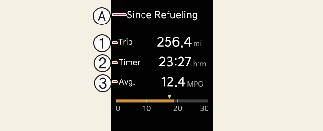
A: Sine Refueling
-
Trip
-
Timer
-
Avg.
The information after charging.
To manually reset the information, press and hold the OK button when viewing the Sine Refueling.
Accumulated Info
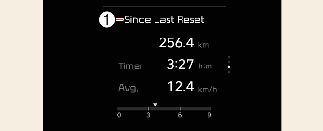
1: Since Last Reset
The information is accumulated starting from the last reset.
To manually reset the information, press and hold the OK button when viewing the Since Last Reset.
-
The vehicle must be driven for a minimum of 300 meters (0.19 miles) since the last cycle before the accumulated driving information is recalculated.
-
The average energy economy is not displayed for more accurate calculation if the vehicle is not drive more than 10 seconds or 50 meters (0.03 miles) since the ENGINE START/STOP button was turned to on.
Master warning mode

1: Check headlamp LED

This mode informs you of the following situations:
-
Driver assistance system malfunction, limitation or radar/camera blockage
-
LED headlamp malfunction
-
Lamp malfunction
-
TPMS failure, low tire pressure, etc.
A Master Warning icon ( )will appear in the lower right corner on the LCD display. If the warning situation is resolved, the master warning light
will be turned off and the Master Warning icon will disappear.
)will appear in the lower right corner on the LCD display. If the warning situation is resolved, the master warning light
will be turned off and the Master Warning icon will disappear.