
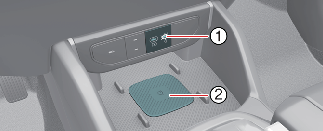
Wireless smartphone charging system (if equipped)
-
Indicator
-
Charging pad
The wireless smart phone charging system charges only the Qi-enabled smart phones ( ).
).
Read the label on the smart phone accessory cover or visit your smart phone manufacturer’s website to check whether your smart phone supports the Qi technology.
The wireless charging process starts when you put a Qi-enabled smart phone on the wireless charging unit.
-
Remove other items, including the smart key, from the wireless charging unit. If not, the wireless charging process may be interrupted. Place the smart phone on the center of the charging pad.
-
The system is available when all doors are closed, and when the START/STOP button is in the ON or START position.
-
You can turn ON or OFF the wireless charging function from the Settings menu in the infotainment system screen. Select Setup → Vehicle → Convenience → Wireless Charging System for Mobile Devices.
-
The indicator light is orange when the smart phone is charging. The indicator light will turn Green when phone charging is complete.
-
The indicator light will blink orange for 10 seconds if there is a malfunction in the wireless charging system.
-
The system warns you with a message on the LCD display if the smart phone is still on the wireless charging unit after the vehicle is turned OFF and the front door is opened.
-
For some manufacturer’s smart phones, the system may not warn you even though the smart phone is left on thewireless charging unit. This is due to the particular characteristic of the smart phone and not a malfunction of the wireless charging.
-
When charging certain smart phones, the charging indicator may not change to green when the smart phone is fully charged.
-
When any smart phone without a wireless charging function or a metallic object is placed on the charging pad, a small noise may sound. This small sound is due to the vehicle discerning compatibility of the object placed on the charging pad. It does not affect your vehicle or the smart phone in any way.

If any metallic object such as coins is located between the wireless charging system and the smart phone, the charging may be disrupted. Also, the metallic object may heat up.

-
When placing your smart phone on the charging pad, position the phone in the middle of the mat for optimal charging performance. If your smart phone is off to the side, the charging rate may be less and in some cases the smart phone may experience higher heat conduction.
-
When charging some smart phones with a self-protection feature, the wireless charging speed may decrease and the wireless charging may stop.
-
The wireless charging process may temporarily stop, when temperature abnormally increases inside the wireless smart phone charging system. The wireless charging process restarts, when temperature falls to a certain level.
-
The wireless smart phone charging system may not support certain smart phones, which are not verifiedfor the Qi specification (
).
-
In some cases, the wireless charging may stop temporarily when the smart key is used, either when starting the vehicle or locking/unlocking the doors, etc.
-
If the smart phone has a thick cover, the wireless charging may not be possible.
-
If the smart phone is not completely contacting the charging pad, wireless charging may not operate properly.
-
Some magnetic items like credit cards, phone cards or rail tickets may be damaged if left with the smart phone during the charging process.
-
During wireless charging, an internal fan operates to prevent overheating. Fan noise may sound.
This device complies with Industry Canada licence-exempt RSS standard(s).
Operation is subject to the following two conditions:
-
This device may not cause interference, and
-
This device must accept any interference, including interference that may cause undesired operation of the device.