
Smart key (if equipped)
With a smart key, you can lock or unlock a door (and trunk) and even start the engine without inserting the key.
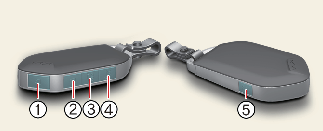
Lock  (1)
(1)
All doors are locked if the lock button is pressed. If all doors are closed, the hazard warning lights will blink and the chime will sound once to indicate that all doors are locked.
If the lock button is pressed again within 4 seconds, the hazard warning lights will blink and the chime will sound once to confirm that the door is locked.
If any door remains open, the hazard warning lights (and/or the chime) will not operate. But if all doors are closed after the lock button is pressed, the hazard warning lights will blink once.
Unlock  (2)
(2)
The driver's door is unlocked if the unlock button is pressed once. The hazard warning lights will blink twice to indicate that the driver's door is unlocked.
All doors are unlocked if the unlock button is pressed once more within 4 seconds. The hazard warning lights will blink and the chime will sound twice again to indicate that all doors are unlocked. After pressing this button, the doors will lock automatically unless you open any door within 30 seconds.
If you attempt to lock or unlock the door by pressing the door lock/unlock button in any of the following states, the door will not be locked or unlocked.
-
When you want to lock or unlock the door in the ACC or ON state.
-
When you want to lock a door in a car with one or more doors open.
For some vehicles, you can remove or set the 2-press unlock (press it twice to unlock).

-
You can activate or deactivate the 2-press unlock function on the infotainment system screen.
-
If the smart key is inoperative due to exposure to water or liquids, it will not be covered by your manufacturer's vehicle warranty.
The infotainment system may change after software updates. For more information, refer to the user's manual provided in the infotainment system and the quick reference guide.
Trunk open  (3)
(3)
If you press this button for longer than a second, the trunk lid will be opened.
Once the trunk lid is opened and then closed, the trunk lid will lock automatically.
Panic alarm  (4)
(4)
The horn sounds and the hazard warning lights blink for about 30 seconds if this button is pressed for more than 0.5 seconds. To stop the horn and lights, press any button on the transmitter.
Remote start  (5) (if equipped)
You can start the vehicle using the Remote Start button (5) on the smart key.
To start the vehicle remotely:
-
Press the door lock button on the smart key within 10 m. (32 ft) from the vehicle.
-
Press the Remote Start button (5) for more than 2 seconds within 4 seconds after pressing the door lock button. The engine will start.
-
To turn off the remote start function, press the Remote Start button (5) once.
-
The vehicle must be in P (Park) for the remote start function to start.
-
The engine turns off if you enter the vehicle without a registered smart key. If you enter the vehicle without the smart key while the car is starting remotely, Carry your key to keep the ignition on is displayed.
-
The engine turns off if you do not get on the vehicle within 10 minutes after remotely starting the vehicle.
-
The engine turns off if you do not get on the vehicle within 10 minutes after remotely starting the vehicle.
-
The Remote Start button (5) may not operate if the smart key is not within 10 m. (32 ft).
-
The vehicle will not remotely start if the engine hood or trunk is opened.
-
Do not idle the engine for a long period.
-
Do not operate remote start in closed areas where there is no adequate ventilation for the engine exhaust.
Start-up (if equipped)
You can start the vehicle without inserting the key.
* For more information, refer to More Details.
Mechanical key
If the smart key does not operate normally, you can lock or unlock the door by using the mechanical key.
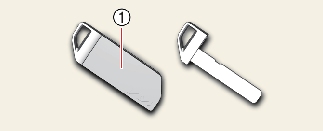
Pull the mechanical key from the protective cover (1).
Smart key precautions
The smart key may not operate if any of the following occur:
-
The smart key is close to a radio transmitter such as a radio station or an airport which can interfere with normal operation of the smart key.
-
The smart key is near a mobile two-way radio system or a cellular phone.
-
Another vehicle's smart key is being operated close to your vehicle.
Tinting the vehicle windows with film, especially metalized film, may interfere with receiving frequency transmitted by the smart key, reducing its operating range.
When the smart key does not work correctly, open and close the door with the mechanical key and contact an authorized Kia dealer.
If the smart key is near your cellular phone or smartphone, the signal from the smart key could be blocked by normal operation of your cell phone or smartphone. This is especially important when the phone is active, such as when making calls, receiving calls, text messaging, and/or sending/receiving emails. Avoid placing the smart key and your cell phone or smartphone in the same pants or jacket pocket and maintain adequate distance between the two devices.

Transmitter
Keep the transmitter away from water or any liquid, as it can become damaged and not function properly.
-
Loss of the smart key
A maximum of 2 smart keys can be registered to a single vehicle.
If you happen to lose your smart key, you will not be able to start the vehicle. You should immediately take the vehicle and remaining key to your authorized Kia dealer (tow the vehicle, if necessary) to protect it from potential theft.
-
If the smart key is inoperative due to exposure to water or liquids, it will not be covered by your manufacturer's vehicle warranty.
-
To prevent the electronic key from becoming damaged by magnetic fields, do not leave it near the following electrical appliances:
-
TVs
-
Personal computers
-
Cellular phones, cordless phones and battery chargers
-
Table lamps
-
Induction cookers
-
-
If you must leave the vehicle's key with a parking attendant, remove the mechanical key for your own use and provide the attendant with the electronic key only.
-
When bringing a smart key onto an airplane, make sure you do not press any button on the key while inside the cabin. If you are carrying the key in your bag etc., make sure that the buttons cannot be pressed accidentally. If you press a button, the key may emit radio waves that could interfere with the operation of the aircraft.
-
If the smart key is not moved for some time, the detection function for smart key operation will pause. Lift the smart key to activate the detection again. (if equipped)