
LCD display modes
|
View |
Description |
|---|---|
|
Driving Assist view |
Displays information related to Driver assistance system |
|
Navigation view |
Displays information related to navigation system |
|
Utility information view |
Displays information related to driving, warning, etc. |
Fuel economy
-
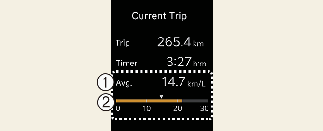
Average Fuel Economy
-
Instant Fuel Economy
-
The average fuel economy is calculated by the total driving distance and fuel consumption since the last average fuel economy reset.
-
Fuel economy range: 0~99.9 L/100km, km/L or MPG
-
-
The average fuel economy can be reset both manually and automatically.

The average fuel economy is not displayed for more accurate calculation if the vehicle does not drive more than 10 seconds or 300 meters (0.19 miles) after the ignition switch or ENGINE START/STOP button is turned to ON.
-
This mode displays the instant fuel economy during the last few seconds when the vehicle speed is more than 8 km/h (5 MPH).
-
Fuel economy range:
0~30 L/100km, km/L or 0~50 MPG
-
Driving assist view

This mode displays the state of:
-
Lane Safety system (if equipped)
-
Smart Cruise Control (if equipped)
-
Lane Following Assist (if equipped)
-
Tire pressure
* For more details, refer to each system information in More Details.
Navigation view

This mode displays the state of the navigation.
Utility information view
Low tire pressure warning display

A : Low tire pressure
Information related to tire pressure.
* For more details, refer to each system information in More Details.
Drive Info display
This display shows the trip distance (1), the average fuel efficiency (2), and the total driving time (3) information once per one ignition cycle.
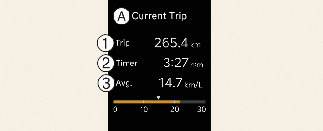
A: Current Trip
-
Trip
-
Timer
-
Avg.
-
Fuel efficiency is calculated after the vehicle has run for more than 300 meters.
-
If opening the driver's door after turning off the engine or 3 minutes passes after restarting the engine, Driving Information is reset.
-
If the engine is running, even when the vehicle is not in motion, the information will be accumulated.
Information since refueling
This display shows the trip distance, the average fuel efficiency, and the instant fuel efficiency (or the total driving time) since refueling.
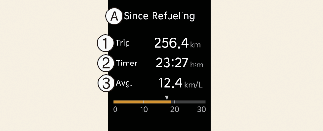
A: Sine Refueling
-
Trip
-
Timer
-
Avg.
-
Information since refueling is calculated after the vehicle has run for more than 300 m (0.19 miles).
-
If you press "OK" button for more than 1 second after the information since refueling is displayed, the information will be reset.
When driving after refueling, the information will be automatically reset.
-
If the engine is running, even when the vehicle is not in motion, the information will be accumulated.
Accumulated driving information mode
This display shows the accumulated trip distance (1), the average fuel efficiency (2), and the total driving time (3).
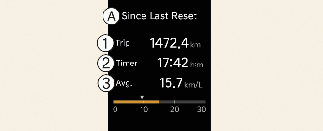
A: Since Last Reset
-
Trip
-
Timer
-
Avg.
-
Accumulated information is calculated after the vehicle has run for more than 300 meters.
-
If you press "OK" button for more than 1 second after the Cumulative Information is displayed, the information will be reset.
-
If the engine is running, even when the vehicle is not in motion, the information will be accumulated.
Master warning mode

This mode informs you of the following situations:
-
Driver assistance system malfunction, limitation or radar/camera blockage (if equipped)
-
LED headlamp malfunction
-
Lamp malfunction
-
TPMS failure, low tire pressure, etc.
At this time, the Master Warning icon ( ) will appear. If the warning situation is solved, the master warning light will be turned off and the Master Warning icon
will disappear.
) will appear. If the warning situation is solved, the master warning light will be turned off and the Master Warning icon
will disappear.
Other view modes
Service mode
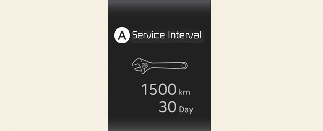
A: Service Interval
Service in
It calculates and displays when you need a scheduled maintenance service (mileage or days).
If the remaining mileage or time reaches 1,500 km (900 miles) or 30 days, "Service in" message is displayed for several seconds each time you set the ignition switch or ENGINE START/STOP button to the ON position.
Service required
If you do not have your vehicle serviced according to the already inputted service interval, "Service required" message is displayed for several seconds each time you set the ignition switch or ENGINE START/STOP button to the ON position.
To reset the service interval to the mileage and days you inputted before:
-
Press the OK button (Reset) for more than 1 second.
If any of the following conditions occurs, the mileage and days may be incorrect.
-
The battery cable is disconnected.
-
The battery is discharged.