
Parking Collision- Avoidance Assist settings
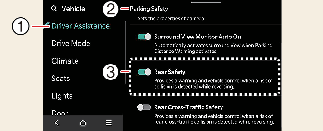
Parking Safety
-
Driver Assistance
-
Parking Safety
-
Rear Safety
With the vehicle on, touch Setup → Vehicle → Driver Assistance → Parking Safety on the infotainment system.
-
Rear Safety: It warns or assists in braking when there is a high risk of collision with pedestrians or objects in the rear direction.

Rear safety will be selected and Parking Collision-Avoidance Assist settings will be retained whenever the vehicle is restarted.
Warning Method
-
Driver Assistance
-
Warning Method
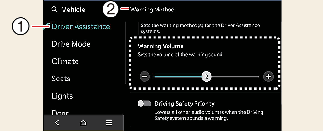
The Warning Method can be set with the vehicle on. Select Setup → Vehicle → Driver Assistance → Warning Method from the settings menu in the infotainment system to change the following settings:
-
Warning Volume: Adjusts the volume of the warning sound.
-
Haptic Warning: Activate the steering wheel vibration warning. (if equipped)
-
If you change the Warning Method, it can be applied to each function of the driver assistance system. Please check and change it in each function.
-
If the vehicle is restarted, Warning Method will maintain the last setting.
-
The setting menu may not exist based on vehicle specification.