
Rear View Monitor operation
Parking/View button
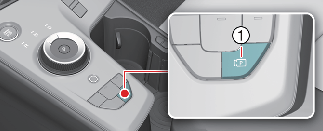
To turn on or off the Rear View function, press the Parking/View button (1) while the gear is in P (Park).
To turn on or off the Rear View while driving, press the Parking/View button (1) while the gear is in D (Drive) or N (Neutral)
Rear view
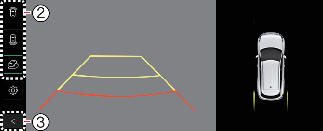
Operating conditions
The Rear View function will turn on under the following conditions:
-
Shifting the gear to R (Reverse).
-
Pressing the Parking/View button (1) while P (Park), N (Neutral) or D (Drive) and the vehicle speed is slower than 10 km/h (6 mph)
Pressing the View switching button (2) with the Rear top view on the screen allows you to select rear top view, rear view, or rear wide view.
Off conditions
The Rear View while driving function will turn off under the following conditions while parking:
-
Shifting the gear to P (Park)
-
Pressing the Parking/View button (1)
-
Pressing the back button (3) on the rear monitor screen
-
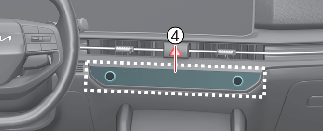
Pressing the infotainment system operation button (4)
-
N (Neutral) or D (Drive) and the vehicle speed is faster than 10 km/h (6 mph)

Rear View will not turn off when the vehicle is in R (Reverse).
Extended Rear View Monitor
Extended Rear View Monitor function maintains the rear view of the vehicle when shifting the gear from R (Reverse) to N (Neutral) or D (Drive) to help you park safely.
Operating conditions
Rear View Monitor will maintain when the following conditions are satisfied:
-
Your driving speed is slower than 10 km/h (6 mph).
-
Shifting the gear from R (Reverse) to N (Neutral) or D (Drive).
Off conditions
Extended Rear View Monitor function will turn off when one the following conditions are satisfied:
-
Shifting the gear to P (Park)
-
Pressing the Parking/View button (1)
-
Pressing the back button (3) on the rear monitor screen
-
Pressing the infotainment system operation button (4)
-
The vehicle speed is faster than 10 km/h (6 mph)
Rear top view
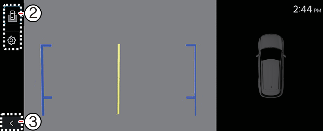
The rear top view shows an image of the vehicle looking down from above, allowing you to determine the distance from the rear vehicle or object when parking.
Press the Rear Top View button(2) to turn on the Rear Top View.
Rear View while driving
By using rear view while driving, you can check the rear view on the monitor, which helps you drive more safely.
Operating conditions
Rear View while driving will turn on under the following conditions:
-
The Parking/View button (1) is pressed, while the gear is in N (Neutral) or D (Drive) and, if the vehicle speed is faster than 10 km/h (6 mph).
You can select rear view or rear wide view by pressing the view switching button (2) on the rear monitor.
Off conditions
The Rear View while driving function will turn off under the following conditions:
-
The gear is shifted to P (Park).
-
Pressing the Parking/View button (1)
-
Pressing the back button (3) on the rear monitor screen
-
Press the infotainment system operation button (4)
-
In all views, the video will not turn off when the vehicle is in R (Reverse) mode.
-
When the rear monitor is activated, the last used view mode will be displayed.
-
Rear parking guidelines are displayed in the rear view and rear top view. Select Setup → Vehicle → Driver Assistance → Parking Safety → Camera Settings → Display Information → Rear Parking Guidelines from the settings menu in the infotainment system to display these function. However, rear parking guidelines are not displayed in the rear view while driving.
-
Rear View while driving will not turn off even if the speed slower to less than 10 km/h (6 mph) after entering.
-
When Rear View while driving is turned on, the rear top view is deactivated.