
Parking Distance Warning settings
Warning Method
-
Driver Assistance
-
Warning Method
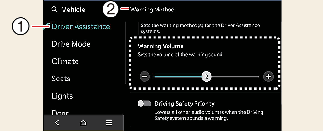
The Warning Method can be set with the vehicle on. Select Setup → Vehicle → Driver Assistance → Warning Method from the settings menu in the infotainment system to change the following settings:
-
Warning Volume: Adjusts the volume of the warning sound.

-
Ensure that Warning Method you have set may apply to the Warning Method of other driver assistance systems.
-
Warning Method will maintain its last setting even if the vehicle is restarted.
-
The setting menu may not be available for your vehicle depending on the vehicle features and specifications.
Parking Distance Warning Auto On
You can set the parking distance warning to always be on at low speeds. To use Parking Distance Warning Auto On function, select Setup → Vehicle → Driver Assistance → Parking Safety → Parking Distance Warning Auto On on the infotainment system.

When the trailer’s connector is plugged into your vehicle, Reverse Parking Distance Warning automatically turns off. In this case, you cannot get help Reverse Parking Distance Warning. Pay extra attention when you drive when the function is inactive. (If a Kia genuine Trailer Kit that can determine whether a trailer is connected is used)
When Parking Distance Warning Auto On is selected, the Parking Safety button indicator ( ) stays on.